
Connect Claude (or any AI) to your CRM via MCP
Most CRMs bolt on a chat sidebar and call it "AI." Groundbase exposes itself as a Model Context Protocol server so your existing AI tools talk to your real CRM data directly. Here's what that actually enables.
Most CRMs in 2026 are racing to add "AI features." They bolt a chat sidebar onto the UI, fine-tune some prompts, market it as transformative. The result is almost always the same: you have to learn a new chat interface inside your CRM, the AI only knows what's on the current screen, and the integration ends at the boundary of what the vendor decided to wire up.
Groundbase takes the opposite approach. Instead of adding AI to the CRM, it lets you connect YOUR AI to it. Groundbase exposes itself as a Model Context Protocol (MCP) server, which means Claude Desktop, Cursor, Windsurf, Cline, or any MCP-compatible client can talk to your real Groundbase data directly. You don't learn a new chat UI — you use whatever AI you already use, and it can now read and modify your CRM.
This post explains what that actually enables and why I built it this way.
What MCP is (briefly)
MCP — Model Context Protocol — is an open protocol introduced by Anthropic in late 2024 that standardizes how AI clients connect to external tools and data sources. Before MCP, every AI vendor had their own approach to "tool use" — ChatGPT had Custom GPT Actions, Claude had its own tool format, Cursor had MCP-like extensions. After MCP, any client that supports the protocol can connect to any server that implements it.
Think of it like USB-C for AI tools. Standardized connection, plug-and-play across compatible devices.
For a CRM specifically: an MCP server exposes a list of "tools" the AI can call (read contacts, create deals, send SMS, look up activity, etc.). The AI client connects, reads the tool list, and can call those tools when the user asks it to do CRM-related work.
What this actually enables
Concrete examples of things you can do once Claude (or your preferred AI) is connected to Groundbase via MCP:
- "Show me my deals closed this month, grouped by stage." Claude queries Groundbase, returns the data, you read it in the same Claude conversation where you're already working.
- "Draft personalized follow-up SMS for everyone tagged 'demo-requested' who hasn't been contacted in 7+ days." Claude pulls the matching contacts, drafts an SMS for each one in their voice, queues them for you to review.
- "Every deal that moved to negotiation this week, add a task to follow up Friday." Claude queries the pipeline, then creates the tasks and links each one to its deal.
- "Look at my dashboard summary and tell me what to focus on this week." Claude pulls dashboard data, gives you a prioritized take in plain English.
- "Find every contact with no recent activity and surface the top 5 worth re-engaging." Claude queries, ranks, presents.
Notice none of these require you to leave Claude. You're already in a Claude conversation drafting emails, writing code, thinking through problems — and now you can also ask it to do real things in your CRM in the same conversation. The CRM stops being an app you context-switch into; it becomes data your AI assistant can work with.
Which AI tools work with Groundbase
Honest breakdown of what's compatible and how:
Direct MCP support (just install + connect):
- Claude — Desktop or claude.ai, both fine. Add the connection URL under Settings → Connectors and sign in. Nothing to install.
- ChatGPT — OpenAI added MCP connector support on its paid plans. Earlier versions of this post said ChatGPT couldn't speak MCP and pointed at a Custom GPT workaround; that was true when I wrote it and is no longer. Check your plan tier, since OpenAI has moved which tiers get connectors.
- Cursor — IDE-focused but supports MCP for general use.
- Windsurf (Codeium) — same.
- Cline — VS Code extension with MCP support.
- Continue — VS Code / JetBrains AI extension with MCP support.
Works via different protocol (OpenAPI Actions instead of MCP):
- Anything without MCP support — you can still reach Groundbase through its REST API, or via a Custom GPT configured with OpenAPI Actions. More setup, same end result.
Doesn't work directly but can integrate over HTTP:
- Anything else — Zapier, n8n, Make, custom code. Groundbase has a REST API, so anything that can call an HTTPS endpoint with a bearer token can read and write your CRM.
There is no single best client any more, which is a change from when I first wrote this. The server is remote and the sign-in is OAuth, so every client above connects the same way: paste one URL, sign in, done. Use whichever AI you already pay for.
Setup
The same two minutes in every client, because they all point at the same address. Per-client steps live at groundbasecrm.com/mcp.
- Copy your connection URL from Settings → AI integrations. It is the same for everybody:
https://mcp.groundbasecrm.com/mcp - In Claude, open Settings → Connectors → Add custom connector and paste it. ChatGPT: Settings → Connectors → New connector. Cursor:
MCP: Add new server. - Save. The client opens a Groundbase sign-in page — your password is typed on my page, never into the AI client.
- Start a new chat and ask "what Groundbase tools do you have?"
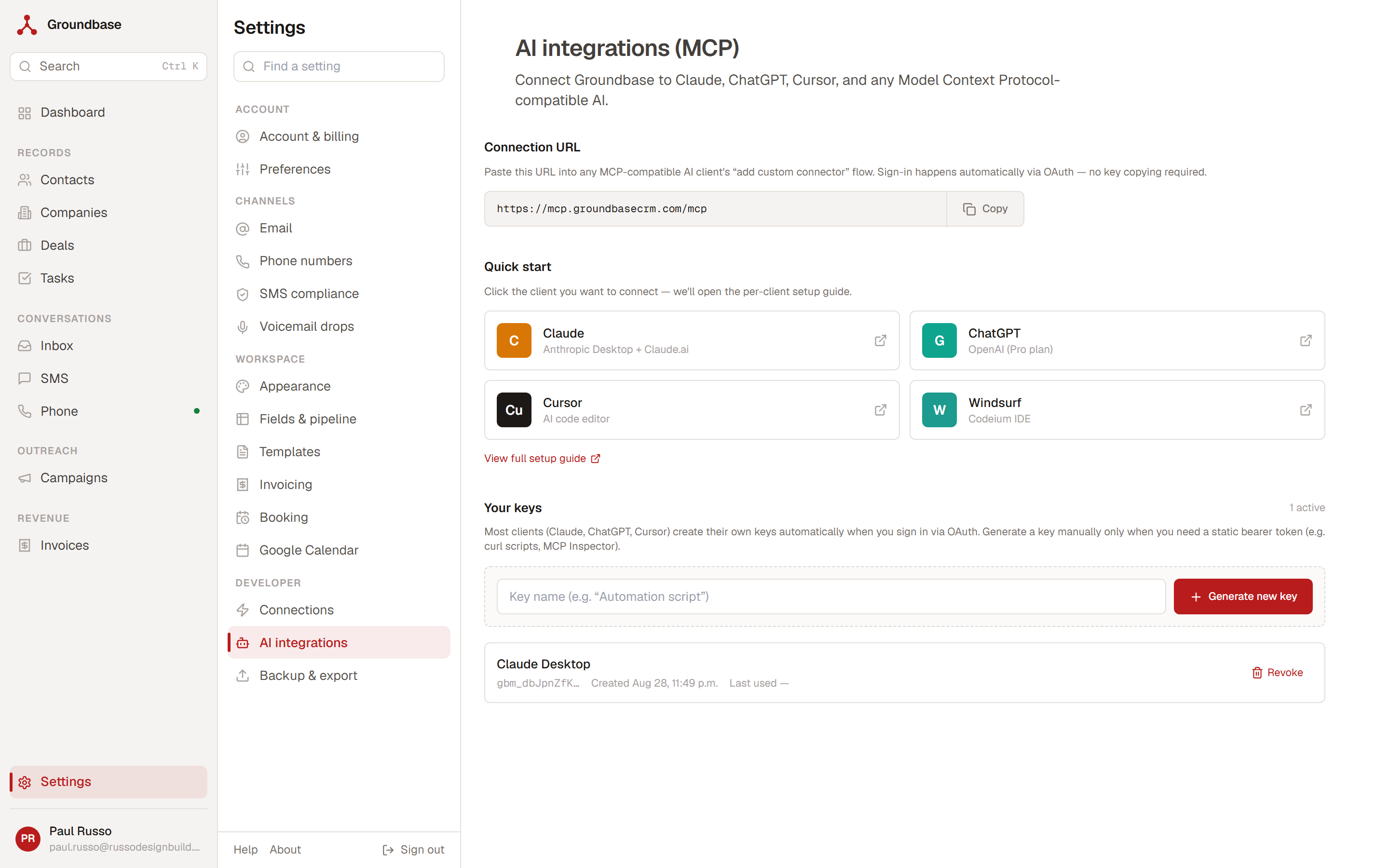
An earlier version of this post told you to generate an API key and paste an npx command into a JSON config file. That was the local-process setup and it is gone. The server runs remotely now and authenticates over OAuth 2.1, so there is nothing to install and no key to copy. If you set it up the old way, the connector flow replaces it.
You can still mint a static key from that screen, but only for things with no OAuth flow of their own — a curl script, MCP Inspector. Each client gets its own token, so revoking Cursor does not sign out Claude, and every key shows its last-used time.
Why I built it this way
A few honest reasons:
1. I don't want to be in the AI race
Building "AI features" into Groundbase would mean picking a model provider, paying for inference, tuning prompts, maintaining quality as models change, and somehow charging for it. Every other CRM is doing this. The unit economics are bad — AI inference costs are real, and customers expect AI features included in their flat subscription, not metered separately.
By exposing MCP and letting customers bring their own AI, I avoid all of that. Inference is between you and Anthropic / OpenAI / whoever you use. Groundbase is the data layer. Cleaner separation, simpler business model, no AI feature creep.
2. The AI you already use is probably better than the one I'd build in
If you're already paying for Claude Pro or ChatGPT Plus or Cursor Pro, you're using a frontier model that's been heavily tuned for general intelligence. Anything I'd bolt into Groundbase as "our AI feature" would be a worse version of what you already have. Better to expose data well and let the good model do the thinking.
3. MCP is the right shape for a multi-tool stack
Solo operators don't use one tool — they use a stack. Groundbase for CRM, Stripe for billing, Linear or Notion for personal task management, GitHub for code, ConvertKit for marketing email. AI assistants that can reach across this stack via MCP are the actual future of how solo work gets done. Being an MCP-compatible source positions Groundbase as a citizen in that stack, not a walled garden trying to swallow adjacent tools.
Where CRM MCP servers actually differ
When I first started building this, MCP was rare in CRM. That changed fast. HubSpot, Salesforce, Zoho, Attio, Microsoft Dynamics, and Monday all ship official MCP servers now. If all you want is for your AI to read CRM data, you have plenty of options and Groundbase isn't special.
The interesting question is no longer whether a CRM has an MCP server. It's what that server lets your AI actually do.
Most of them expose records. You can list contacts, create a deal, update a property, log that a call happened. HubSpot's is a good example: read and write across contacts, companies, deals, tickets, and engagements, and it can draft an email. It cannot send one, and it cannot send or schedule an SMS.
Groundbase's server exposes actions. sms_send_now and sms_send_scheduled dispatch real messages through your own Twilio account. email_send sends. campaigns_manage starts and stops a send. voicemail_drops_drop leaves a voicemail.
That's the difference between an AI that can look at your pipeline and an AI that can work it. Ask Claude to text the twelve people who went quiet after a demo, and with a records-only server you get twelve drafts to copy and paste somewhere else. With Groundbase they go out.
I haven't audited every CRM MCP server on the market, and I found one that goes further than the rest: Zoho's Bigin can send email through Zoho's MCP platform. Zoho CRM itself can't — same vendor, different answer — and neither sends an SMS. HubSpot's and Close's can draft an email but not send it, and neither touches SMS.
So the honest version is narrower than "nobody else does this." You can get there with another CRM by running a second MCP server for Twilio, or routing through something like Zapier's, and letting the model pull a phone number out of one system and send the message from another. That genuinely works. It's also two servers, two sets of credentials, and a model stitching them together across a boundary where things quietly break.
What Groundbase does is collapse that into one place. The thing holding the contact is the thing sending the message, under one sign-in, with the send logged back against the contact automatically. If you find another CRM whose own MCP server sends SMS directly, tell me and I'll update this.
Try it
Start a Groundbase trial, copy the connection URL from Settings → AI integrations, add it as a connector in Claude and sign in. It takes about 5 minutes. The first time you ask Claude "what's in my pipeline right now?" and get a real answer pulled from your actual deals, the value proposition lands more clearly than any feature comparison page could.
(If you want context on why the rest of Groundbase is shaped this way too, the who Groundbase is for post lays out the assumptions explicitly.)
Questions about this one? Email me directly: blog-mcp@groundbasecrm.com — I read every one.
Built by a solo dev. Try it.
Start your 14-day trial →More from the Pipeline
Quotes with a deposit: price the job before you invoice it
A quote in Groundbase is a priced offer the customer accepts online, optionally by paying a deposit through…
How to leave Groundbase
Everything you put into Groundbase comes out with one button, at any time, including after you stop paying.…
Free offline CRMs for Windows (2026): what's out there and what each one needs
Most "free CRMs" are a website with a free plan, a user limit and a contact cap. If you want one that runs …
Bill your hours without retyping them
Track time with a timer or log it after the fact, let the hourly rate remember itself, and put the unbilled…