
When a spreadsheet stops working as a CRM (six signs it already has)
A spreadsheet is a perfectly good CRM for longer than most people admit. Here are the specific signals that yours has stopped working, and the honest case for staying put a while longer.
Most advice about spreadsheets-as-CRMs is written by people selling CRMs, and it all says the same thing: you have outgrown it, upgrade now.
I sell a CRM. I am going to argue the opposite first, because it is true, and because the specific moment a spreadsheet stops working is more useful than a general claim that it will.
A spreadsheet is a real CRM
If you are tracking people you need to follow up with, and a sheet is doing that, you have a CRM. It is not a lesser thing. For a lot of one-person businesses it is the correct tool for years.
What it is genuinely better at than any CRM I know:
- You can see everything at once. No records, no detail pages, no clicking in. The whole business on one screen is a real advantage and most CRMs cannot reproduce it.
- It bends to you instantly. New column, done. In a CRM that is a custom field, a settings page, and a decision about types.
- Nobody has to be taught it. You already know how it works.
- It is free, and it will still open in ten years.
Anyone telling you a sheet is unprofessional is selling something. Plenty of profitable businesses run on one.
The question is not whether a spreadsheet can work. It is whether yours has stopped.
Six signs it already has
These are specific on purpose. "You have too many contacts" is not a signal — I know people running four thousand rows happily and people who should have moved at forty.
1. You cannot answer "when did I last talk to this person?"
The sheet has their name and number. The actual conversation is in your inbox, your texts, and your memory. Answering a simple question means checking three places and guessing.
This is the first crack, and it is the one people tolerate longest.
2. You have started encoding meaning in colour.
Yellow means chased, red means gone cold, bold means they matter. It works, and it is a sign the sheet has run out of ways to hold what you know. Colour is not queryable, does not survive a sort, and means nothing to anyone but you — including you in six months.
3. There are two versions.
One on your laptop, one on your phone, or one you share with a VA and one you actually use. The moment you have to think about which is current, the sheet has stopped being a source of truth and become a document.
4. Following up depends on you remembering.
A sheet cannot nudge you. Every follow-up that happens is one you thought of. That works when you have twenty relationships. At two hundred, the ones you forget are invisible — you never find out about the deal you lost by not calling.
5. You have started avoiding it.
The one people recognise immediately. If updating the sheet feels like admin you do later, it is already out of date, and an out-of-date sheet is worse than none because you trust it anyway.
6. You want it to do something, not just hold something.
Text these forty people. Remind me in a week. Tell me who has gone quiet for a month. A spreadsheet is a record. The moment your actual need is an action, you have hit the wall that no amount of clever formula work gets you over.
The one that actually decides it
If you take one thing from this: a spreadsheet records what happened, and a CRM can do something about it.
Everything above is a variation on that. History you cannot see, follow-ups you have to remember, actions you cannot take from where the data lives. A sheet is a filing cabinet, and at some point what you need is not a better filing cabinet.
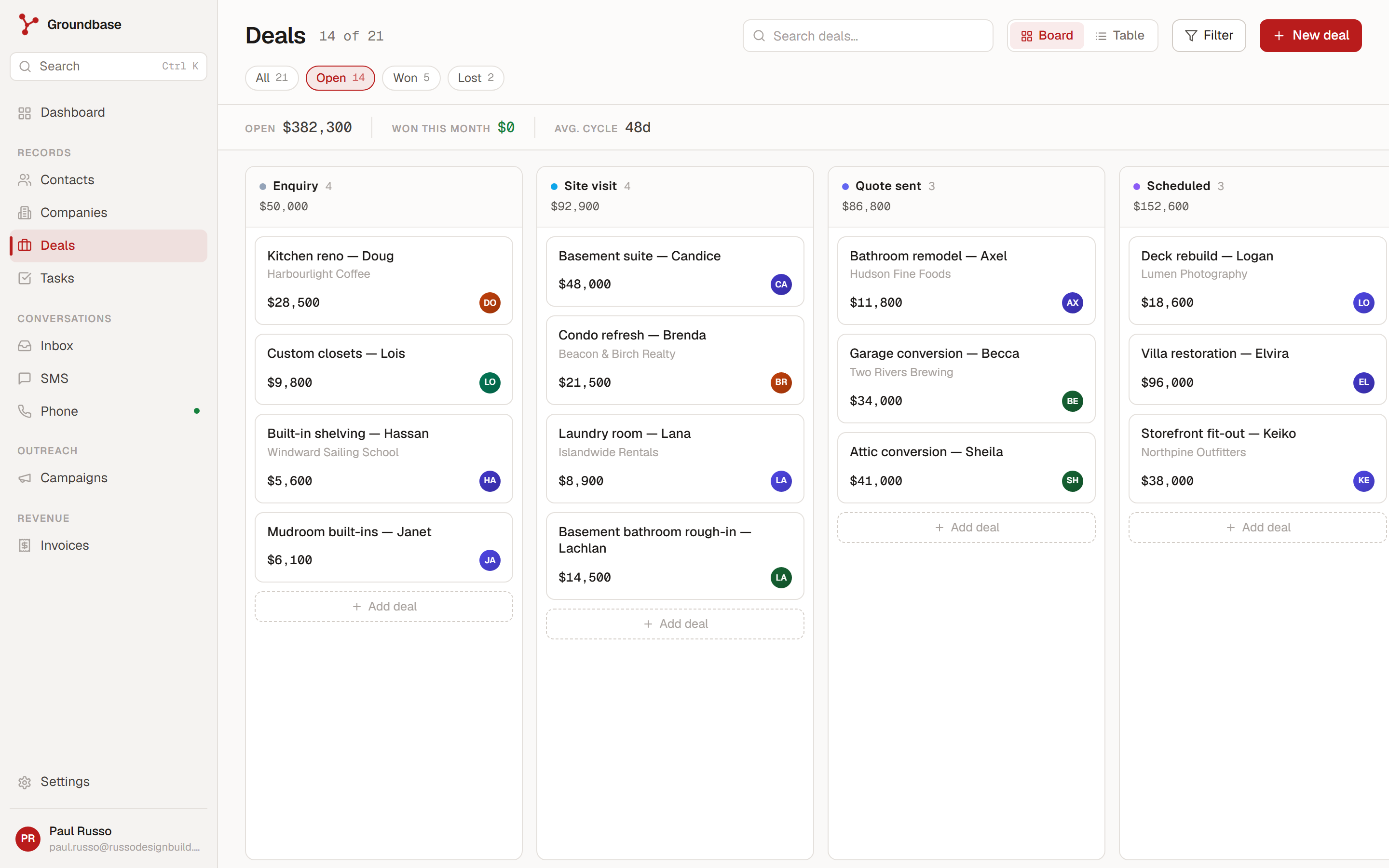
A sheet can hold every one of those columns. What it cannot do is be a board, a total and a filter at the same time without you rebuilding it each way.
That is also the honest limit of the argument. If your work genuinely is recording — a list of accounts you review quarterly, contacts you look up rather than pursue — a sheet is not failing you and nothing here applies.
What you actually lose by moving
Nobody selling a CRM tells you this part, and it is the reason plenty of migrations get abandoned:
- The one-screen overview goes. Records live on their own pages. Most people miss this for a fortnight and then stop noticing, but the first week is genuinely worse.
- Instant flexibility goes. Adding a field becomes a small decision instead of typing in a header.
- You will pay something, and you will spend an afternoon on setup.
- You have to actually use it. A CRM you update sporadically is a worse spreadsheet.
If you are between two and three of those six signs, seriously consider staying put. The sheet is not the bottleneck yet.
If you do move, move badly on purpose
The most common way a migration fails is trying to make it perfect.
Bring the contacts, not the history. You will be tempted to reconstruct every past conversation. Do not. Import names, emails, phone numbers and any tags worth keeping, and let history accumulate from today. A CRM with three months of real activity beats one with two years of half-remembered notes you never trust.
Keep the sheet for a month. Read-only, as a safety net. You will stop opening it faster than you expect, and you will stop worrying about what got lost.
Do not recreate all your columns. Half of them existed because a sheet had no other way to store that thing. Custom fields exist, but bring the ones you actually filter on, not the ones you have.
Pick the boring thing you do most and check it works. For most people that is "look someone up and see what happened last". If that is fast, you will use the tool. If it takes four clicks, you will not, no matter what else it does.
What to look at, honestly
If you have concluded you have outgrown the sheet, the thing to check first is whether a CRM can act — send the message, book the meeting, run the follow-up — or whether it is a prettier database that will leave you back in your inbox anyway. That distinction matters more than the feature list.
The concrete version of it: a drip that stops when someone replies, which is the thing a sheet fundamentally cannot do, because it requires knowing the reply arrived.
If messaging people is a big part of why you are moving, what SMS actually costs is worth reading before you pick anything, because CRMs that bundle texting mark it up heavily and the difference at volume is substantial.
And I wrote an honest who Groundbase is and is not for, which includes the cases where you should not use it. If you are running a team with handoffs and territories, or you need deep reporting, that page will save you a trial.
Leaving your spreadsheet should be a decision you make because it stopped working, not because someone told you it was unprofessional. If none of the six signs above describe you, close this tab and go back to your sheet. It is doing its job.
Not sure whether you have hit the wall yet? Describe your setup and I will tell you honestly: blog-spreadsheet@groundbasecrm.com — I read every one.
Built by a solo dev. Try it.
Start your 14-day trial →More from the Pipeline
Bill your hours without retyping them
Track time with a timer or log it after the fact, let the hourly rate remember itself, and put the unbilled…
Set up a booking link that keeps your Google Calendar free
A step-by-step setup for a Groundbase booking link that only offers the times you actually want to give awa…
Free offline CRMs for Windows (2026): what's out there and what each one needs
Most "free CRMs" are a website with a free plan, a user limit and a contact cap. If you want one that runs …
Quotes with a deposit: price the job before you invoice it
A quote in Groundbase is a priced offer the customer accepts online, optionally by paying a deposit through…