
How to warm up a new email domain (a four-week schedule, and what actually gets you filtered)
You verified the domain, the DNS is green, and your first campaign still went to spam. Warming is the missing step — here is the schedule, the number that matters more than volume, and how to enforce it without watching a clock.
You bought a domain, verified it with your sending provider, published SPF, DKIM and DMARC, watched every record go green, and sent your first real campaign to four hundred people.
Most of it went to spam. Nothing was misconfigured.
The missing step is warming, and it is the one part of email setup that cannot be done in an afternoon, because the thing you are building is not configuration. It is a reputation, and reputations are made of time.
Why a correct domain still gets filtered
Authentication answers "is this message really from who it claims to be from?" Reputation answers a completely different question: "do people want mail from this sender?"
SPF, DKIM and DMARC settle the first one. They say nothing about the second, which is why a perfectly authenticated cold blast still lands in spam — the checks pass, and the filter still has no reason to believe anyone asked for this. If you have not set those up yet, SPF, DKIM and DMARC in plain English is the prerequisite; warming an unauthenticated domain is wasted weeks.
A brand-new domain has no reputation at all. That sounds neutral. It is not — to a filter, unknown is closer to suspicious than to trusted, because every spammer in the world is also sending from a domain nobody has seen before. Spammers burn domains constantly, which means "new domain, sudden volume" is one of the most reliable spam signals in existence.
So when a fresh domain goes from zero to four hundred messages in a day, you have not just failed to build trust. You have actively produced the exact pattern filters are tuned to catch.
The schedule
The shape is: start small, increase gradually, stay consistent. A workable four-week version for a one-person business:
| Week | Per day | What you are doing |
|---|---|---|
| 1 | ~20 | Sending only to people who will open and reply |
| 2 | ~40–50 | Same audience quality, roughly double |
| 3 | ~100 | First genuinely cold sends, in small proportion |
| 4 | ~200 | Increase only if week 3 stayed clean |
After that, keep roughly doubling weekly until you reach whatever your actual volume is.
Treat those numbers as a shape, not a law. There is no published table any provider guarantees, the right pace depends on your list and your content, and anyone quoting exact figures with total confidence is guessing more precisely than the evidence supports. What is not in dispute is the direction: gradual beats sudden, and consistent beats bursty.
Two things matter as much as the daily number:
Send every day, not in bursts. Twenty a day for a fortnight builds more reputation than 280 in one Tuesday afternoon. A steady low volume looks like a business. A weekly spike looks like a campaign tool.
Do not skip days and then catch up. Silence followed by a surge resets much of what you built, because the surge is the signal, not the total.
The part most warming guides skip
Volume is the easy half. Here is the half that actually decides whether any of this works.
Warming only works if the mail is engaged with. Filters are not counting your messages, they are watching what recipients do with them. Opens, replies, and being moved out of spam all build reputation. Deletions without reading, and especially spam complaints, destroy it.
Which leads to the conclusion nobody selling a warming tool likes to state plainly: you cannot warm a domain by sending to a cold purchased list. Sending twenty a day to people who never asked to hear from you does not build a reputation slowly. It builds a bad one slowly.
The first fortnight should go to people who will genuinely open and ideally reply — existing customers, past clients, people who have emailed you before, your own other accounts if you must. You are trying to teach mailbox providers that mail from this domain is wanted. That lesson requires actual evidence.
Google's published threshold for bulk senders is a spam complaint rate below 0.3%, and they are explicit that above that you should expect problems. Three complaints in a thousand is not much room. It is reached almost instantly by a list you bought.
Doing this without watching a clock
The obvious problem with a warming schedule is that it requires you to personally not send too much, every day, for a month, while doing your actual job. That fails the first time you get busy.
In Groundbase it is two settings.
A daily send cap. Under Settings → Email → Daily send limit, set a number — for the whole account, for one sending domain, or both. Campaign email stops for the day once you hit it. The messages over the line are not dropped and not failed — they stay queued and go out the next day, so the schedule enforces itself rather than requiring your attention.
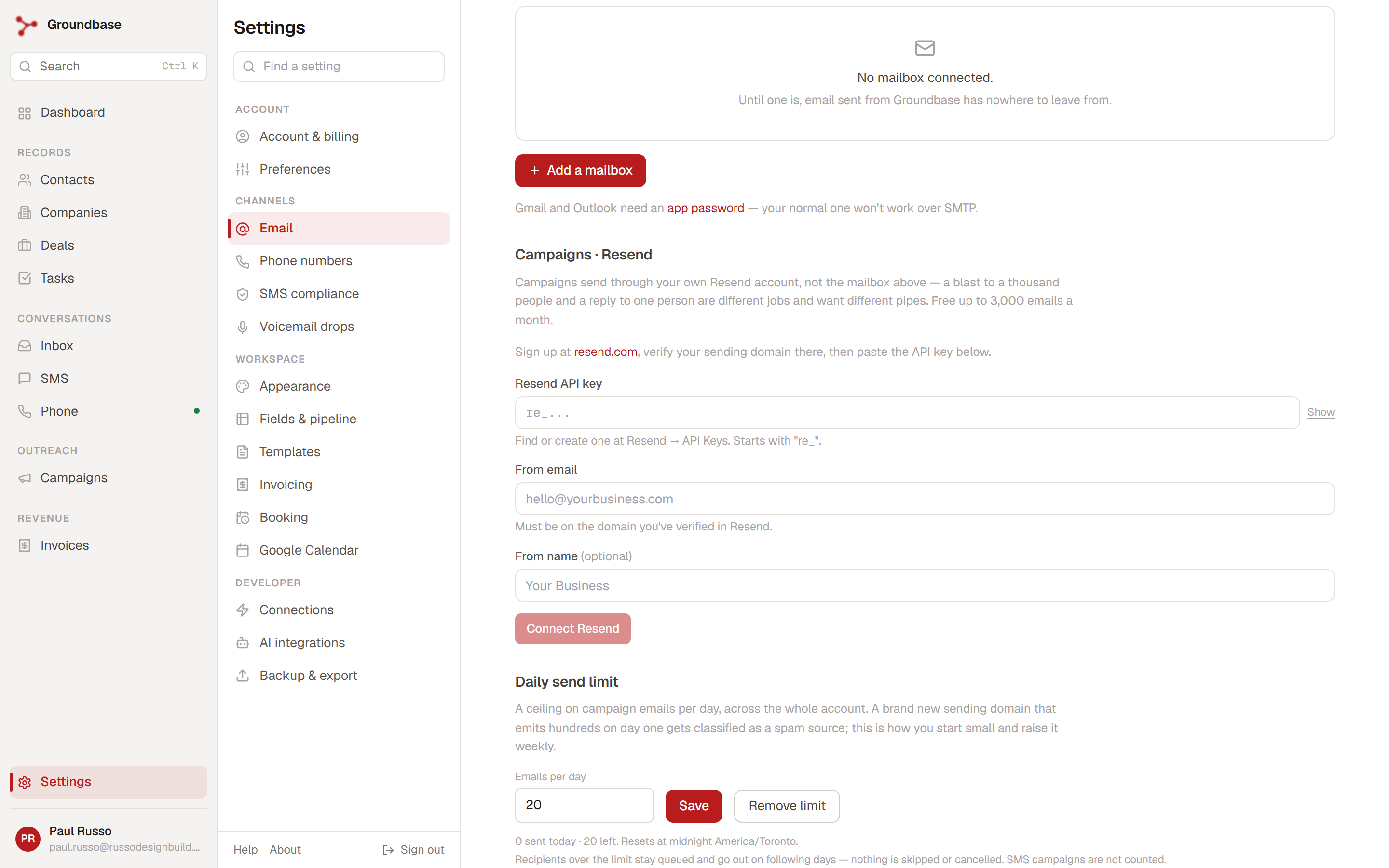
There is a detail worth knowing: when several campaigns are running under a cap, the sender interleaves them rather than draining one at a time. Without that, the first campaign eats the entire day's allowance and the others send nothing for days.
A sending window. Per campaign, set the hours mail is allowed to go out. Anything due outside the window waits rather than sending. This one matters for a reason separate from warming: a cold email arriving at 3am reads as automated, because it is.
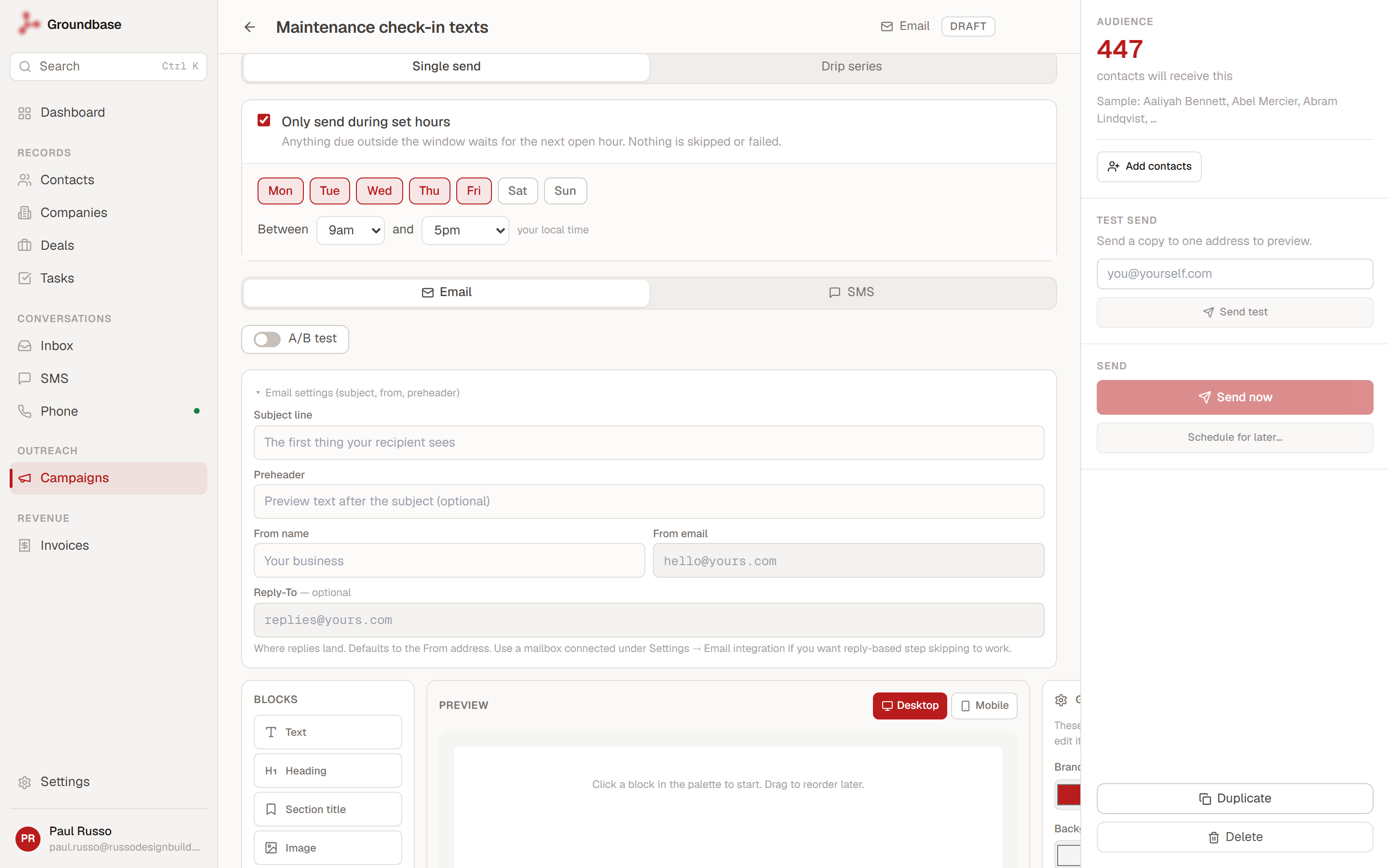
That example is a text campaign rather than an email one, which is a useful illustration of where the two settings differ: the window applies to both channels, the daily cap only to email. Texting has no domain reputation to protect, so it is never held back by the cap — but 8am is still 8am, and a maintenance reminder arriving at 4am is its own kind of problem.
Both behave the same way at the boundary — defer, never fail. A held message keeps its place and goes when it is allowed to. Nothing is silently dropped, which is the behaviour you want from anything standing between you and your own customers.
The limits, stated plainly
Because a guide that oversells the tooling is worse than no guide:
- It is email only. SMS is never held by this cap. Texting has its own entirely separate rules, which are about carriers rather than reputation — that is A2P 10DLC, not warming.
- The cap is per account or per sending domain, not per campaign. An account-wide limit covers every campaign email you send; a per-domain limit applies only to mail from that one domain. When both are set, both apply — an email goes out only if it fits under each. Reputation belongs to the domain, so if you are warming a new outreach domain alongside an established one, give the new domain its own limit rather than letting one account-wide number share a day's allowance between them.
- The day boundary is local midnight in your account's timezone, not UTC, so the reset happens when your day does.
What warming does not fix
Bad content. Spam-trigger phrasing, a message that is one big image, link shorteners, an aggressive subject line. Reputation gets you delivered; it does not make a bad email good.
A bad list. Covered above, and it is the most common reason warming "does not work". If your bounce rate is high because the addresses are stale or scraped, warming just spreads the damage across more weeks.
No unsubscribe path. For bulk sending, one-click unsubscribe is now expected rather than polite, and the alternative to an easy unsubscribe is a spam complaint — which costs you roughly a hundred times more.
A shared IP's problems. On most providers you share sending infrastructure with other customers. Your domain reputation is yours, but you do not control everything.
A previously burned domain. If you already blasted from it, you are not warming, you are rehabilitating, and that takes considerably longer. Some people buy a new domain instead. Which brings us to the last thing.
Use a subdomain
Send bulk and cold mail from something like mail.yourdomain.com or go.yourdomain.com, not your root domain.
Domain reputation is largely tracked per subdomain. Keeping outreach separate means that if a campaign goes badly, the invoices and replies you send from your personal address on the root domain are insulated. Set this up before you warm, because you warm whichever domain you will actually be sending from — and discovering afterwards that you warmed the wrong one costs you the whole month. In Groundbase, this is exactly what the per-domain daily limit is for: twenty a day on the new outreach subdomain, while your main domain keeps its own separate budget.
Setting up Resend and verifying your sending domain walks through the DNS for exactly this. If you are sending through Gmail rather than a dedicated provider, warming matters far less — you inherit Google's reputation — and your constraint is Gmail's sending limits instead.
The short version
Authenticate first. Send from a subdomain. Start at roughly twenty a day, to people who will actually open. Increase gradually, send every day, and watch complaints rather than volume. Set a cap so the schedule survives a busy week.
A month is a long time to spend on plumbing when you want to be selling. It is considerably shorter than the time it takes to recover a domain you burned in an afternoon.
Warming a domain and not sure whether your numbers are sensible? Tell me the list and the pace: blog-warmup@groundbasecrm.com — I read every one.
Built by a solo dev. Try it.
Start your 14-day trial →More from the Pipeline
Bill your hours without retyping them
Track time with a timer or log it after the fact, let the hourly rate remember itself, and put the unbilled…
Set up a booking link that keeps your Google Calendar free
A step-by-step setup for a Groundbase booking link that only offers the times you actually want to give awa…
Free offline CRMs for Windows (2026): what's out there and what each one needs
Most "free CRMs" are a website with a free plan, a user limit and a contact cap. If you want one that runs …
Quotes with a deposit: price the job before you invoice it
A quote in Groundbase is a priced offer the customer accepts online, optionally by paying a deposit through…