
Twilio A2P 10DLC for solo operators (and how to figure out if you even need it)
A2P 10DLC is genuinely confusing. Here's the structural overview, the rejection traps I hit firsthand, and a quick test to figure out whether you can skip it entirely.
A2P 10DLC is one of those things that sounds like a small administrative hurdle until you're three hours into a Twilio Trusthub registration trying to figure out what "Number Pool Vetting Score" means. The acronym soup, the multi-step flow, the carrier review process, the rejection feedback that uses different terminology than the form you filled out — it's all genuinely confusing.
This is the version I wish I'd had when I started. It's NOT a step-by-step approval guide (Twilio's documentation is more authoritative on the exact form fields). It's the structural overview — what A2P is, how it's organized in Twilio, where it goes wrong, and an honest test for whether you can skip it.
What A2P 10DLC actually is
A2P = Application-to-Person. 10DLC = 10-Digit Long Code (i.e., a standard U.S. phone number, the kind your Twilio account gives you, as opposed to a short code like 12345).
Until 2021, anyone could sign up for a Twilio number and send SMS to U.S. recipients with no compliance overhead. Then U.S. carriers (T-Mobile, AT&T, Verizon) collectively decided this was being abused by spam, and required all senders to register their business + their intended use case before sending. That's A2P 10DLC.
It applies to ANY SMS you send TO U.S. recipients via a Twilio standard long code. Doesn't matter if you're sending 5 messages a month or 5 million — if the recipient has a U.S. number, you need to be registered.
The disqualifier — do you actually need it?
Before spending hours in Trusthub, check whether your use case actually triggers A2P. Some common cases that DON'T need A2P registration:
- You're only using Twilio Verify (the OTP / verification API). Verify uses different carrier infrastructure than standard messaging — Twilio handles those carrier relationships, you don't register A2P.
- You're only sending to international (non-U.S.) recipients. Different countries have different regulatory frameworks; A2P 10DLC is U.S.-specific.
- You're using a U.S. short code (the 5-6 digit format like
12345). Short codes have their own approval process, separate from A2P. - You're using a U.S. toll-free number for SMS. Toll-free has its own verification process (not the same as A2P 10DLC).
If ANY of the above describes your use case, you can probably skip A2P entirely. (For my own case: I send SMS verification codes at user signup via Twilio Verify, so no A2P needed. The platform itself is BYO Twilio — my customers connect their own accounts and register their own A2P for their own sending.)
If none of the above apply — you're sending real SMS to U.S. numbers via a standard long code — read on.
The structure: Profile, Brand, Campaign
Twilio organizes A2P registration in a service called Trusthub. Three things to register (in order):
- Customer Profile — your business identity. Legal name, EIN or sole-proprietor identifier, address, website. This is the "who are you" layer.
- A2P Brand — your sender identity as it relates to messaging. Mostly derived from your Customer Profile + a few extras. Brand registration takes the business info from your profile and submits it to The Campaign Registry (TCR) for vetting.
- A2P Campaign — the specific use case you're registering. "Marketing," "2FA," "Account Notification," "Mixed," etc. You can have multiple campaigns per brand. Each campaign is reviewed separately and gets its own monthly fee.
You register them in that order: Profile → Brand → Campaign. You can't skip ahead.
The walkthrough in Twilio Console
From your Twilio Console dashboard:
- Profile: in the side panel, click Products and Services → Profile. Register your business here. You'll likely need actual documentation proving your business exists — EIN paperwork if you're an LLC/Corp, business registration paperwork if sole proprietor.
- Trusthub: side panel → Products and Services → Trust Hub → Registrations. This is where the A2P-specific stuff lives.
- Create A2P Brand: from the Registrations page, start a new A2P Brand registration. Twilio pre-fills most of it from your Customer Profile. Submit for vetting.
- Create A2P Campaign: once the brand is approved, create a campaign. This is where you pick the use case category, write the campaign description, supply sample messages, and provide your opt-in consent language.
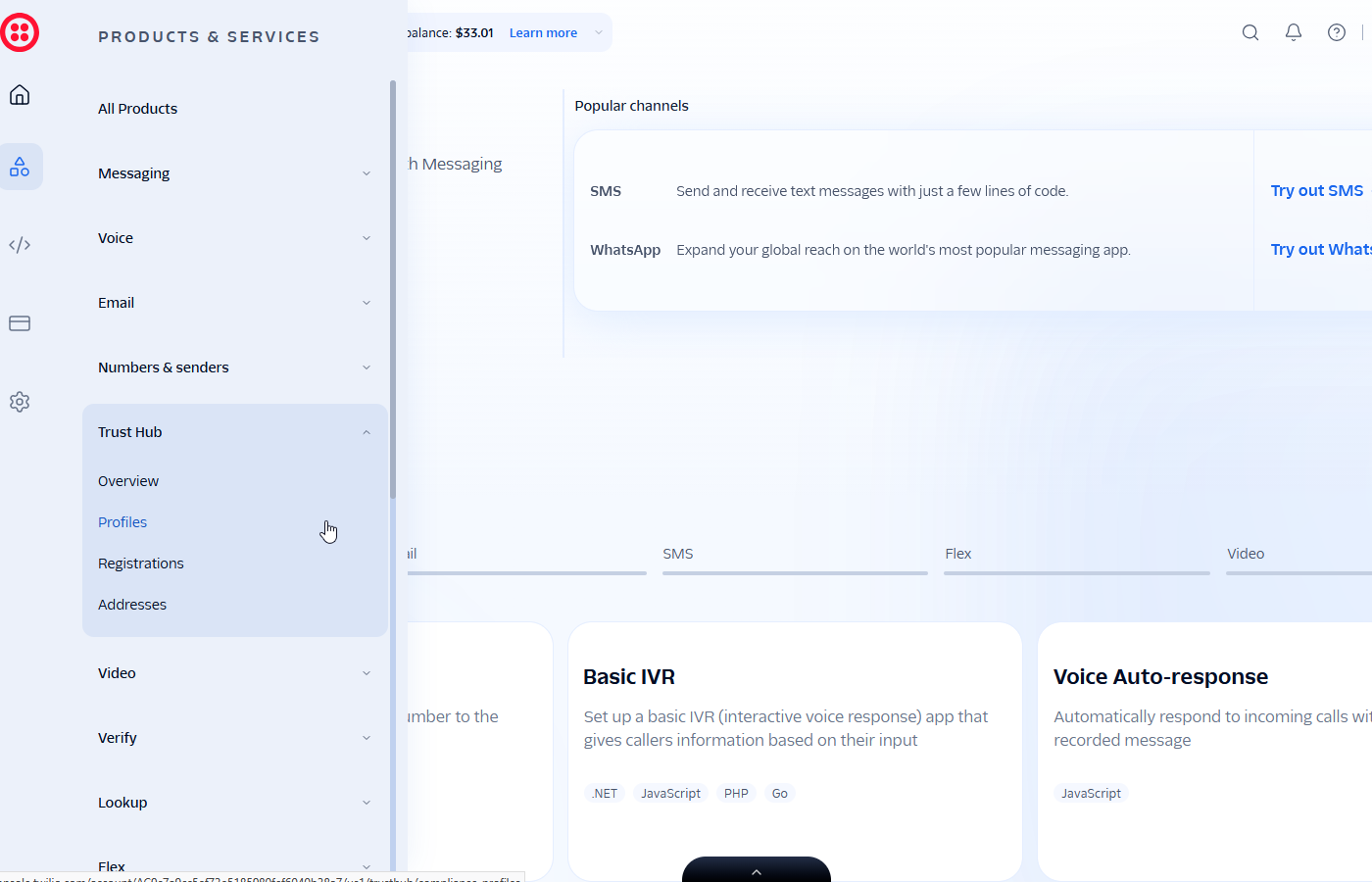
Most of the confusion isn't in WHERE to click — it's in what to write on the campaign form, which is where most rejections happen.
The most common rejection trap
The campaign creation form is where most of the back-and-forth with Twilio's compliance reviewers happens. The key fields are the Campaign Description, the Sample Messages, and the Opt-in Consent language:
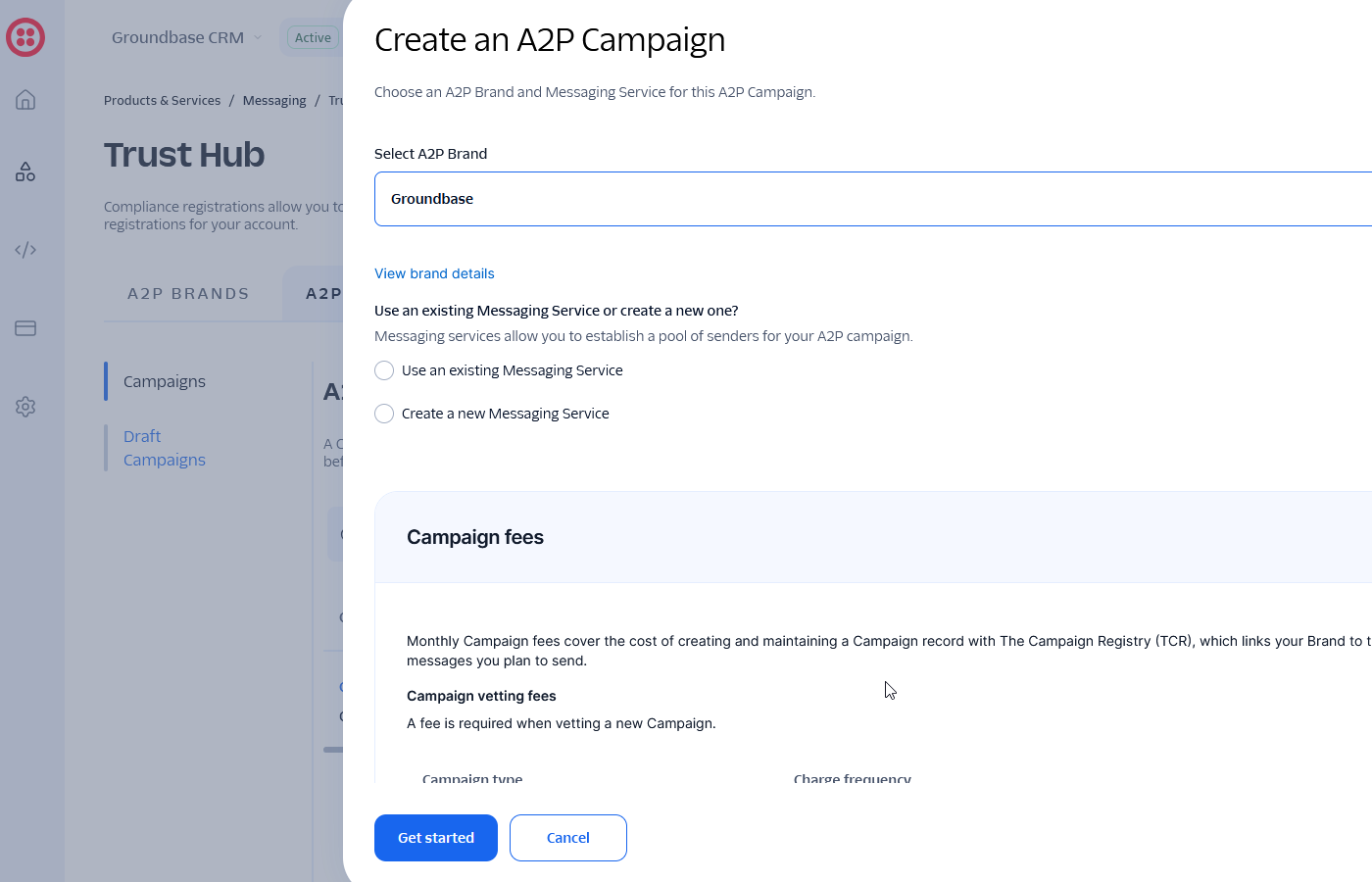
When I registered my A2P campaign, the rejection feedback I got from Twilio's compliance reviewer was, in their words:
"In your campaign description, you mention sending appointment confirmations, follow-up messages, lead outreach, and customer service replies. However, your opt-in form states that the phone number is collected only for sending a one-time SMS 6-digit code."
The trap: the campaign description and the opt-in consent language have to MATCH. If you say "we send appointment confirmations + lead outreach + customer service replies" in the campaign description, but your signup form's opt-in checkbox says "we'll text you a verification code," the reviewer flags it. The recipient consented to one thing; you're saying you'll do something different. Carriers treat that as a consent violation.
The fix is either:
- Narrow the campaign description to match the consent ("we send one-time verification codes" → pick the 2FA use case)
- OR broaden the consent language in your signup form to match the campaign description ("by submitting, you agree to receive appointment confirmations, follow-up messages, and customer service replies in addition to verification codes")
Pick whichever ACTUALLY matches what you'll do. Don't broaden the consent if you'll only send OTPs — you've now misled your own users. Don't narrow the campaign if you'll send marketing — your sends will be flagged later.
This consent/description matching is the single most common rejection cause. Worth getting right on the first submission to save a multi-day re-review.
Other rejection traps to know about
Beyond the consent/description mismatch:
- Vague campaign descriptions. "Sends messages to users" gets rejected. Reviewers want specifics: who the recipients are, what kinds of messages, in response to what trigger.
- Sample messages that don't match the description. If your description says "appointment confirmations," your sample messages should be appointment confirmations, not "Welcome to Acme Corp!"
- Missing opt-out instructions in sample messages. Each sample message should clearly include opt-out language (e.g., "Reply STOP to opt out").
- Mismatched business info. If your Customer Profile says you're "Acme LLC" but your website footer says "Acme Inc," reviewers flag it.
Costs
I paid roughly $19.50 total for brand + campaign registration (Low-Volume Standard tier). That breaks down approximately as:
- Brand registration: ~$4 (one-time)
- Campaign vetting fee: ~$15 (one-time)
On top of that there are ongoing costs:
- A per-campaign monthly fee (usually around $10/month per campaign)
- A small per-message fee added to standard SMS pricing for A2P-registered sends
These numbers were accurate when I registered but Twilio revises fees periodically. Check Twilio's A2P pricing page for current numbers before budgeting.
Timeline (rough)
Approval timing varies a lot. Brand vetting can be hours to days. Campaign vetting is often longer — days to a few weeks depending on the use case category and the reviewer's queue depth. If your campaign gets rejected (like mine did), expect another full review cycle after you submit corrections — not instant.
Plan for at least a week between starting the registration and being able to send your first compliant SMS. Sometimes faster, sometimes much longer if your use case requires extra scrutiny.
After approval
Once your campaign is approved, link it to the Twilio phone numbers you'll be sending from. (In Twilio Console: each phone number has a Messaging Service or campaign assignment.) Sends from a number not linked to an approved campaign will either be blocked or get filtered to spam by carriers.
You can have multiple campaigns under one brand if you have multiple use cases (e.g., one campaign for transactional notifications, another for marketing). Each is separately reviewed and separately billed.
If email is the other half of your setup, verifying a sending domain with Resend is the equivalent one-time chore on that side.
Once registration clears, one of the first things worth switching on is appointment reminders from the booking page — they go out through the number you just registered.
When you'd skip this entirely
If you go back to the disqualifier at the top — Verify-only, international-only, short code, toll-free — you skip A2P. For a lot of solo operators just starting out, Twilio Verify covers their immediate need (OTP at signup) and they don't have a real SMS sending use case yet. In that case, don't preemptively register A2P. The brand + campaign fees are wasted if you're not actually sending.
Register when you have a concrete SMS use case lined up and the customers waiting to receive those messages. Until then, you're paying for compliance you don't need.
A note on my own setup
For full transparency: I originally registered Groundbase as ISV-Reseller (a brand type for SaaS platforms enabling others to send) because the platform had a multi-tenant + credits-markup architecture. We later pivoted to pure BYO Twilio — customers connect their own Twilio account directly to Groundbase, which means each customer handles their own A2P registration independently. My ISV-Reseller brand registration is now essentially dormant.
This guide is written for the Standard / Low-Volume Standard brand path, which is what most solo operators will use. The Twilio Console navigation is the same regardless of brand type — only the specific use case categories and approval flow differ.
If you're curious about why I pivoted away from the credits-system / ISV-Reseller architecture, I wrote that up separately: Why I killed Groundbase's credits system and went BYO Twilio.
TL;DR
- A2P 10DLC is U.S. carrier-mandated registration for standard long-code SMS sending
- Twilio Verify, toll-free numbers, short codes, and international-only setups don't need it
- Register Profile → Brand → Campaign, in that order, in Twilio Trusthub
- The single most common rejection cause is the campaign description and opt-in consent saying different things
- Costs ~$19.50 to register + ongoing monthly fee per campaign + small per-message fee
- Plan for at least a week start to "first compliant send"
The process is genuinely a maze, but the maze has a finite shape. Once you've walked through it once, it makes sense. The first time through is the hard part.
Questions about this one? Email me directly: blog-a2p@groundbasecrm.com — I read every one.
Built by a solo dev. Try it.
Start your 14-day trial →More from the Pipeline
How to warm up a new email domain (a four-week schedule, and what actually gets you filtered)
You verified the domain, the DNS is green, and your first campaign still went to spam. Warming is the missi…
When a spreadsheet stops working as a CRM (six signs it already has)
A spreadsheet is a perfectly good CRM for longer than most people admit. Here are the specific signals that…
Why Groundbase is three apps, not one
Web, Windows desktop and Android, built and maintained by one person. Here is the reasoning, the tax it cha…
Notion as a CRM — where it genuinely works, and where it structurally cannot
Notion is a far better CRM than people give it credit for, right up until you need it to do something rathe…