
Why I removed Sequences from Groundbase (and what replaced them)
On 14 September I deleted a whole feature rather than keep improving it. Groundbase had three ways to send someone a series of messages, and one was enough to cut. Here's how I decided, what moved where, and why deleting was the better fix.
On 14 September I deleted Sequences from Groundbase — not hid, deleted, from every app, the API and the AI connection. Groundbase had three different ways to send someone a series of messages, and the only thing Sequences did that the other two couldn't was small enough to move, so I moved it and removed the rest.
This is the reasoning, because "I deleted a feature" sounds like a loss, and for a one-person product it was the opposite.
Three ways to do one job
By September, Groundbase could send a series of messages three different ways:
- Sequences — a per-contact cadence. Text on day 0, email on day 3, a task on day 7.
- Workflows — "when this happens, do that." A deal moves, a tag lands, a text arrives, and a set of steps runs, waits included.
- Campaign drips — a series of emails and texts to a whole list, with a daily limit and a sending window.
Each was its own engine, with its own editor, its own rules about when it stopped, its own help article and its own bugs. And Groundbase is three apps, so every one of those existed on web, desktop and Android.
The clearest sign something was wrong was a screen I'd built myself:
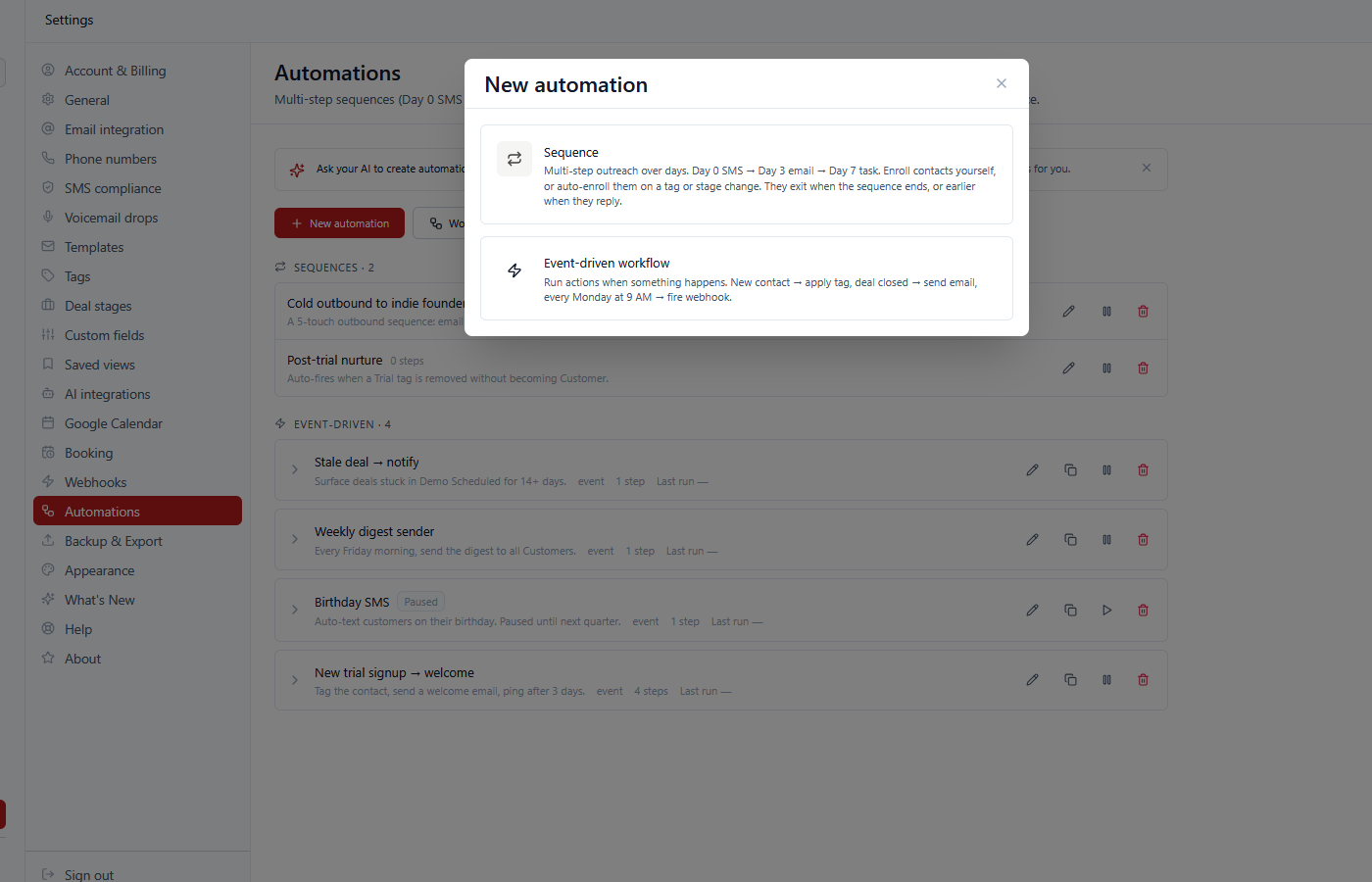
If I need a dialog to help someone choose between two of my own features, I've built two features where there should be one. Every person who landed there had to learn the difference before they could do the thing they came to do.
The question
On 13 September I finally asked it straight: do we even need Sequences, if we have Workflows and campaigns?
Laid side by side, the answer was no — with one exception. Workflows already did the per-contact version: a trigger, some steps, waits of days in between. Campaign drips already did the list version. The one thing only Sequences did was check, before every step, whether the person had replied, booked a meeting, or opted out — and skip the rest if so.
That check is the whole difference between a follow-up and a nag. It's what stops a "just checking in" text going to someone who said yes an hour earlier. So it couldn't disappear. It needed to live somewhere else.
Moving the one thing that mattered
So before deleting anything, I built that check into the other two:
- Workflows got it on the Wait step. When a wait ends, the run looks at the contact first: if they've replied, booked a meeting or opted out since the run started, it stops there, and the run history says why.
- Campaign drips gained "Booked a meeting" alongside the replied, opened and clicked options they already had.
Then I checked it on real runs before trusting it — one that should stop, and one that shouldn't. Here's the same check on the demo account: a contact was tagged, the workflow parked on its wait, and she booked a meeting before the wait ended. When it woke up, it stopped instead of sending:
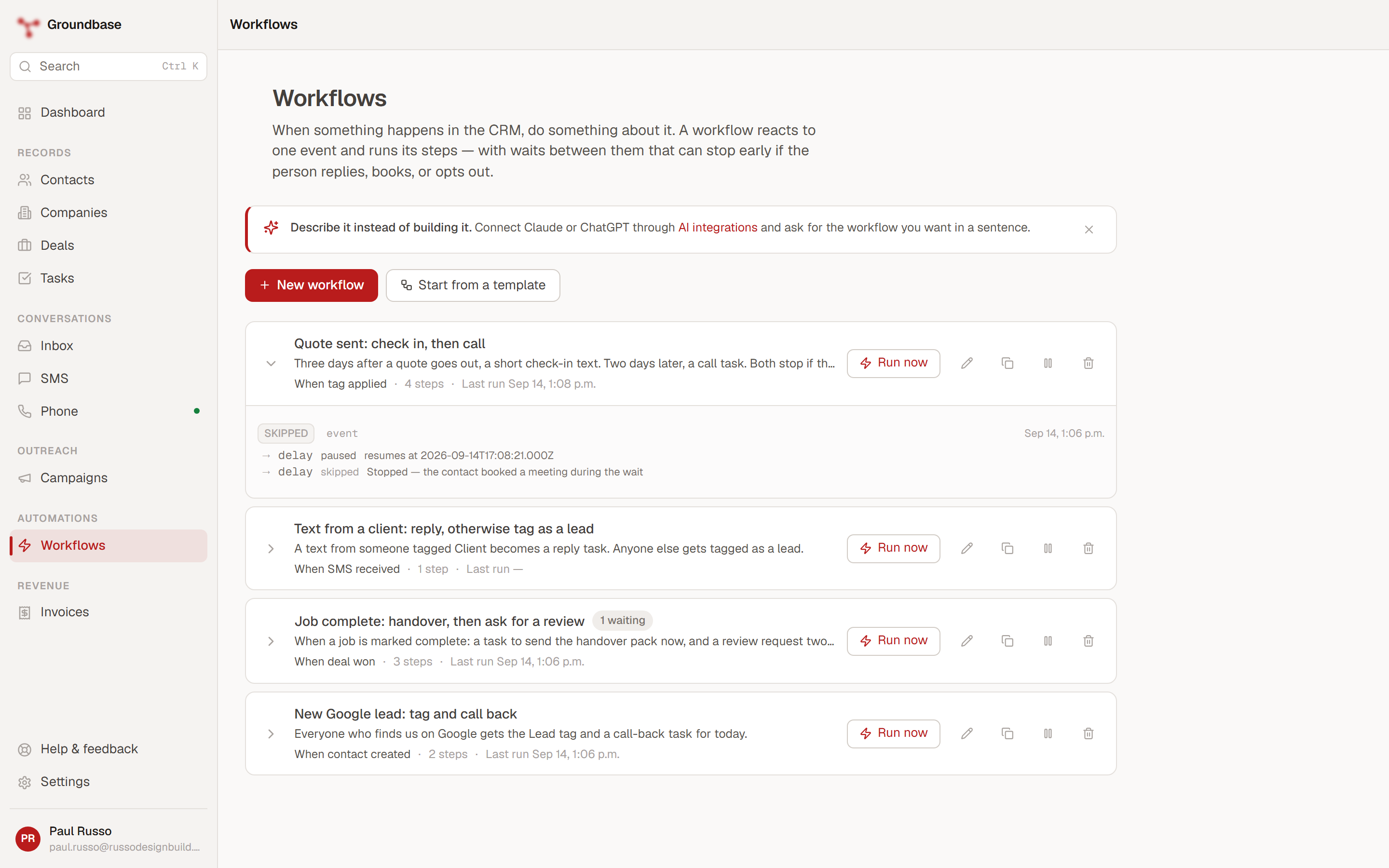
Only after that did Sequences go. The screens, the menu entries, the engine, the API routes and the AI tools all went on the same day. Old links to Sequences now land on Workflows. The old data is still stored for now, read by nothing, and will be dropped in a later release.
Why delete it, rather than keep improving it
Because a feature I keep is a feature I have to test, document, explain and fix, three times over, forever.
Keeping Sequences meant maintaining a third engine that did a job two others already did. Every improvement to "how follow-ups stop" would have needed making in three places, and every bug in one would have raised the question of whether the other two had it too. For a team, that's a cost. For one person, it's where the week goes.
The line I wrote in the workflows guide is the short version: one way of doing a thing is easier to trust than two. That's true for the people using it, who no longer have to learn which feature is which. And it's true for me, because there's now one place to look when a follow-up does something unexpected.
Which to use now
It's a simpler question than it used to be:
| You want to… | Use |
|---|---|
| Follow up with one person when something happens — a quote goes out, a tag lands, a deal moves | A workflow with waits that stop on reply, booking or opt-out |
| Send a series to a list of people, at a pace | A campaign drip, with a daily limit and a sending window |
| Keep a series running for anyone who joins a list later | An ongoing campaign, fed by a workflow tagging people |
Email and text campaigns in your CRM covers the drip side in detail, and the workflows guide covers the rest.
What it cost
Being straight about it: if you'd built follow-ups as Sequences, they don't turn into workflows by themselves. A four-step sequence becomes a workflow with a trigger, the same steps, and waits with the stop boxes ticked — a few minutes to rebuild, but minutes you didn't ask to spend.
It also cost a familiar word. People search for "sequences" because every other CRM uses it. That's why the workflows guide says plainly: if you've used sequences somewhere else, this is that.
The part I'd tell another solo builder
Adding a feature feels like progress and removing one feels like retreat, which is exactly backwards once you're maintaining everything yourself. The features that cost the most aren't the big ones. They're the ones that overlap with something else, because they double every decision, every bug and every explanation.
The hard part isn't the deleting. It's admitting the overlap — especially when you built both sides of it. I'd written a whole dialog to help people choose, which is a lot of effort to spend avoiding the question.
Groundbase is a CRM for one-person businesses that sends email and texts through your own accounts and connects to the AI assistant you already use. It has one fewer way to do that than it did a month ago, and it's better for it. More on why it's built the way it is: why I built Groundbase as a solo dev, and the other kind of no — why Groundbase won't build social media management.
Deleted a feature of your own, or wish your tools would? I'd like to hear about it: blog-removed-sequences@groundbasecrm.com — I read every one.
Built by a solo dev. Try it.
Start your 14-day trial →More from the Pipeline
Our email campaign reported 60 clicks. One was a person.
Across 24 outreach campaigns sent between 1 and 21 September 2026, Resend reported about 60 unique clicks. …
Why Groundbase is three apps, not one
Web, Windows desktop and Android, built and maintained by one person. Here is the reasoning, the tax it cha…
Per-seat pricing: what a one-person business actually pays (checked September 2026)
Per-seat pricing should mean one person pays for one seat. Several CRMs charge a solo operator for more — s…
Multiple email accounts in one CRM: how Groundbase decides which one sends
You can connect as many Gmail, Outlook or other IMAP/SMTP mailboxes to Groundbase as you like and read them…