
Email and text campaigns in your CRM: drips, daily limits, and follow-ups that stop when they reply
Groundbase campaigns send email and texts to a segment of your contacts — one-off blasts or multi-step drips that switch channel per step and skip ahead when someone replies or books. Here's how they work, what they need, and what they don't do.
Groundbase campaigns send an email or a text to a segment of your contacts, either all at once or as a multi-step drip where each step can be email or text and later steps are skipped if the person has already replied or booked a meeting. Email goes through your own Resend account and texts through your own Twilio, so there's no per-send fee from Groundbase — and a daily limit and sending window keep a new domain from looking like a spam source.
This is the feature for anything one-to-many: a seasonal offer, a check-in to past customers, or the four-touch follow-up every quote deserves and almost nobody sends by hand.
One-off or drip
Every campaign starts with a choice:
- Single send — one message, to everyone in the audience, now or at a scheduled time. Scheduled campaigns fire from the server, so nothing needs to be open on your computer.
- Drip series — several steps with a wait between each. Step 1 goes when someone enters; each later step waits its delay after the one before.
Drips are where campaigns earn their keep, because each step can be a different channel. An estimate follow-up might be an email, then a text two days later, then another email, then a final text — which is exactly the one I staged for the screenshot below. Anyone missing the address a step needs, like a phone number for a text step, skips that step and carries on.
Steps that know when to stop
A drip that keeps chasing someone who already said yes is worse than no drip. So from step 2 onward, every step has its own "Skip this step if the contact already…" options:
- Opened the previous email and Clicked a link in the previous email — email only, and only if you've turned tracking on (more on that below)
- Replied — to a text, automatically; to an email, only once replies reach a mailbox you've connected (explained below)
- Booked a meeting — through your booking page, or a meeting you added yourself
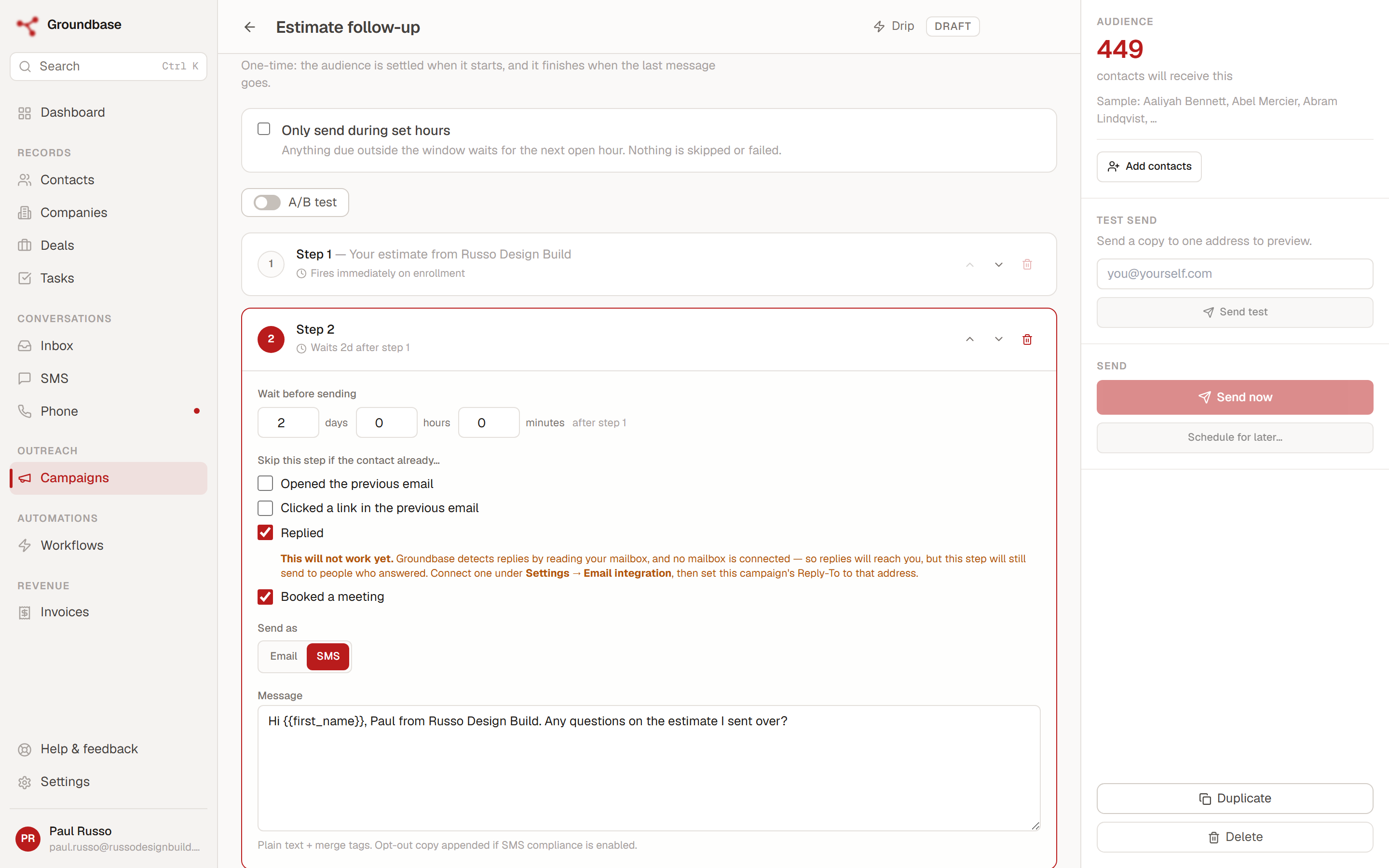
There's a warning in that screenshot worth reading, because it's the product telling the truth. Reply-skipping only works if Groundbase can see the reply, and for email that takes one setup step most people miss.
Texts need nothing. A reply lands on your own Twilio number, and Groundbase sees it.
Email needs the reply to reach a mailbox you've signed into. Campaign email goes out through Resend, from an address on your sending domain, and by default replies go back to that same From address. Groundbase only sees a reply if it arrives in a mailbox you've connected under Settings → Email → Your mailboxes — the account you sign in with its app password. A Resend sending address usually isn't one of those, so out of the box, email replies go somewhere Groundbase can't read, and "Replied" never fires.
The fix is the campaign's Reply-To field: set it to an address you've connected as a mailbox. Replies then land where Groundbase reads them, and the next step is skipped the way you'd expect. If your From address is itself a mailbox you've connected, that works too. The amber text in the screenshot is the editor telling you this isn't set up yet, rather than letting you find out from an annoyed customer.
Who gets it
A campaign's audience is a filter over your contacts — most often a tag — and the recipient count updates as you change it, with a few sample names so you can sanity-check who's about to hear from you.
Some people are always left out, whatever the filter says: anyone with no address on that channel, anyone who has unsubscribed, and anyone who has texted STOP. Unsubscribes are global across your account; there's no per-campaign override.
One-time or ongoing. By default a campaign's audience is settled the moment it starts. Switch it to Ongoing and it becomes a standing programme instead: every five minutes it re-runs its filter and brings in anyone who newly matches, always starting at step 1. Nobody is enrolled twice, and nobody who finished is started again.
That makes an ongoing campaign the natural partner for a workflow. A workflow tags a contact — say, when a deal moves to Quote sent — and the campaign aimed at that tag picks them up on its own. A workflow can also add someone directly with its Add to campaign step.
The throttles: a daily limit and a sending window
Two settings sit between a campaign and the inbox. Both wait rather than fail — a message held back by either stays queued and goes at the next opportunity. Nothing is dropped, and nothing is marked failed.
The daily send limit caps campaign emails per day. You can set it for the whole account, for a single sending domain, or both — and when both are set, an email goes out only if it fits under each. It exists mostly for warming a new domain, which is covered properly in how to warm up a new email domain.
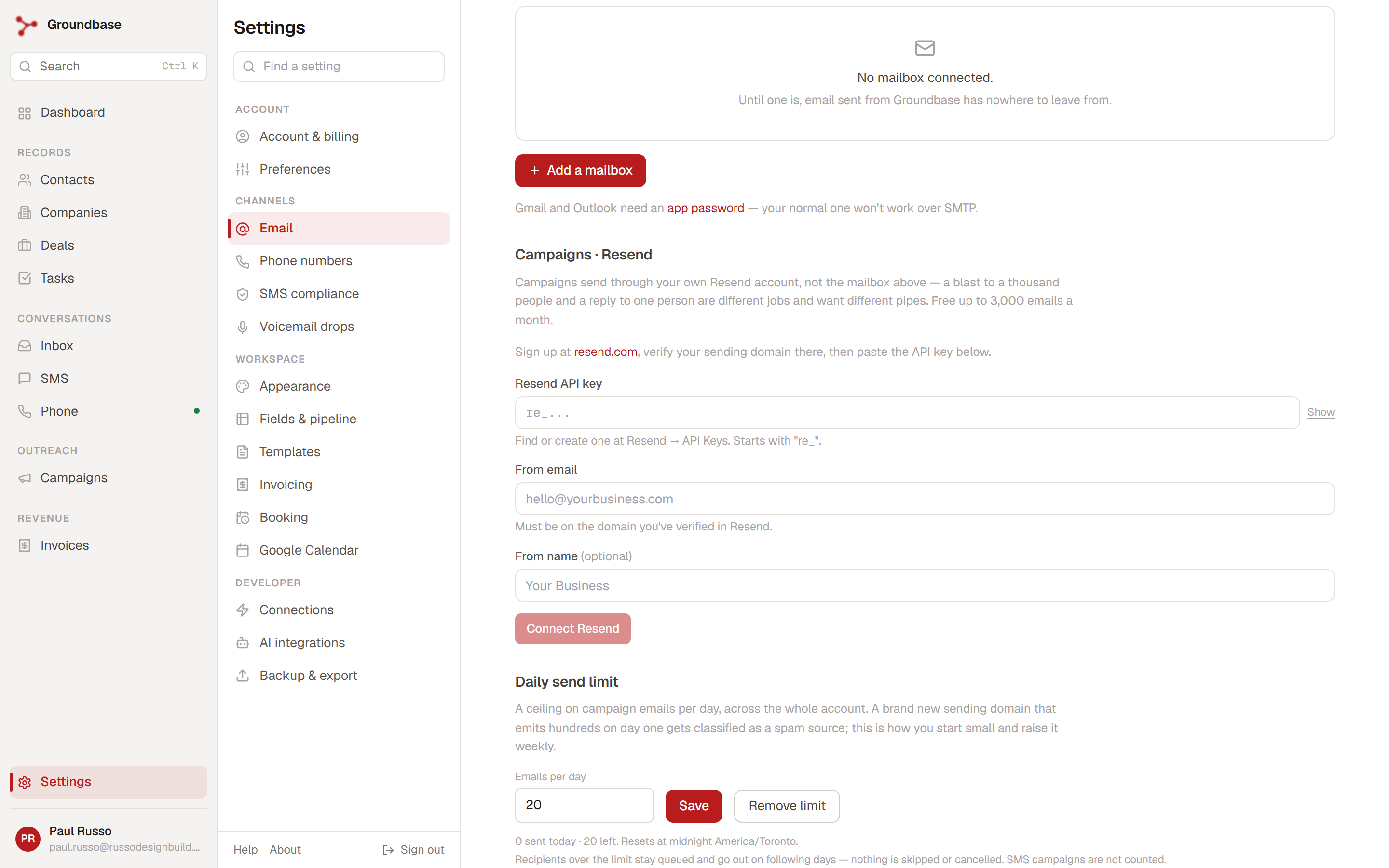
The sending window is set per campaign: particular days and hours, in your local time. Outside it, messages wait.
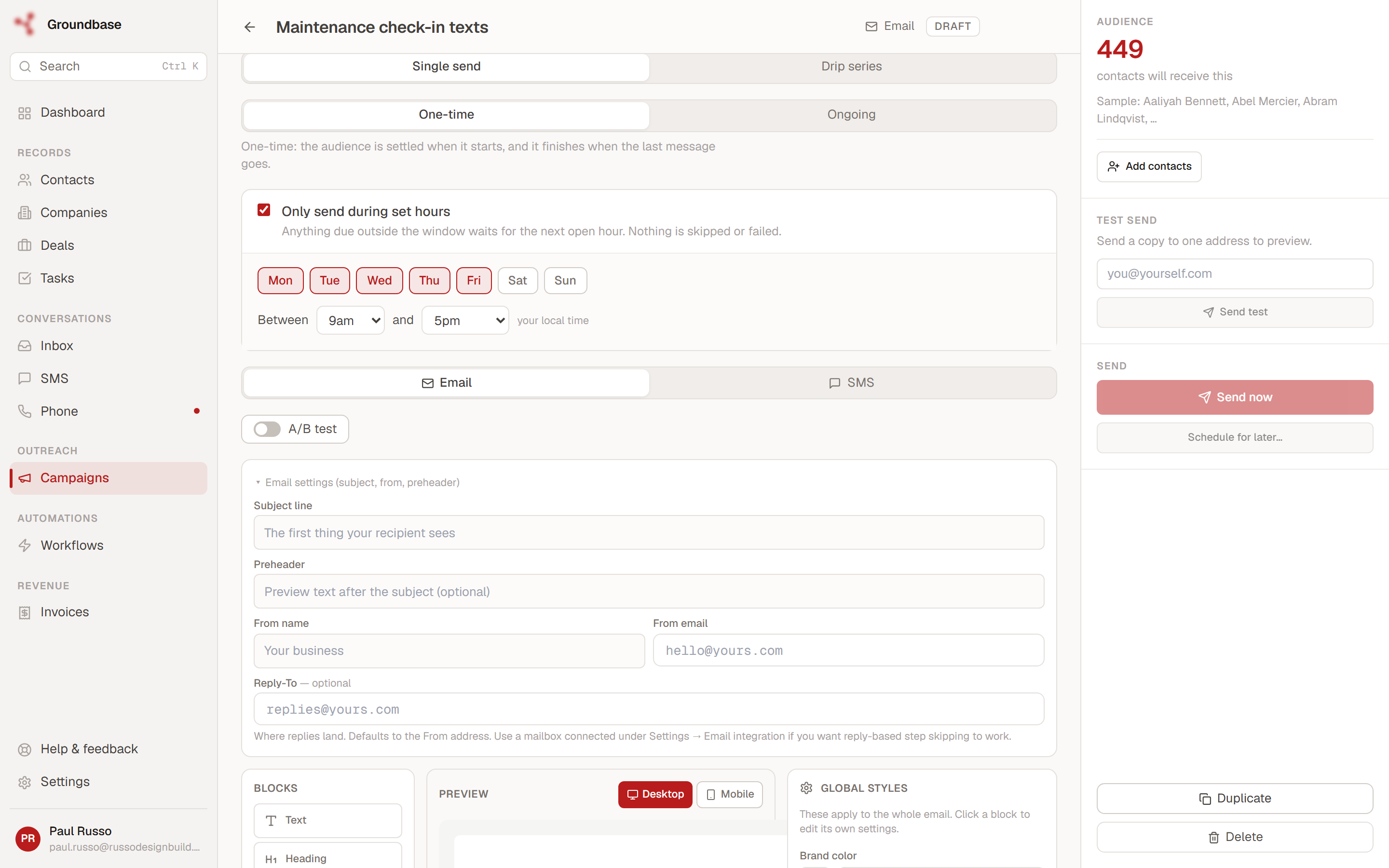
Two details that matter once you're running more than one campaign:
- Campaigns share the daily limit, and they take turns. With a limit of 20 and four active campaigns, you get roughly five from each rather than twenty from the first and none from the rest.
- Follow-up steps draw on the same limit as first sends. A four-step drip eventually costs four sends per person, so as a drip fills up, fewer new people enter each day. If a campaign seems to crawl, that's usually why.
Texts are never counted against the daily limit — texting runs on carrier rules rather than email reputation, which is what A2P 10DLC is about.
A/B testing
You can test two versions of a campaign against each other, and each person is assigned a variant as they enter. On a drip, only the first email is tested — the variants differ at step 1, and the rest of the series is the same for everyone. That keeps the result readable: you're learning which opening works, not untangling four steps of differences.
What you'll see afterwards
Once a campaign is sending, it reports sent and failed counts, deliveries and bounces for email (with the reason, so a dead address is distinguishable from a temporary failure), replies, and opt-outs.
Opens and clicks are off until you turn them on, and that's deliberate. Tracking happens on Resend's side and needs a tracking subdomain; until it's set up, opens and clicks read zero no matter what happens. Even when it's on, treat opens as a rough signal — Apple Mail loads the tracking pixel whether or not anyone read the email — and clicks as the one worth trusting. The Campaigns help article walks through the setup, including the Cloudflare setting that breaks every link if you get it wrong.
What it doesn't do
Being straight, because this is where a features post usually stops being useful:
- It isn't a marketing automation suite. No landing pages, no ad management, no behavioural retargeting. It sends messages to people you already have.
- The audience filter is simple. Tags and the basics, not "opened campaign X but didn't click." If you need deep behavioural segmentation, a dedicated email platform does that better.
- Email needs Resend. Campaigns send through your own Resend account, not your personal mailbox — a hundred identical emails from Gmail is how you get marked as spam. Resend's free plan covers 3,000 emails a month at up to 100 a day; setting up Resend and verifying your sending domain is the one-time setup.
- An ongoing campaign's messages are locked while it's sending. You can rename it and change its audience and window, but not what it says — changing a drip part-way through is a different campaign, so duplicate it.
Where it fits
Groundbase is a CRM for one-person businesses that sends email and texts through your own accounts and connects to the AI assistant you already use. Campaigns are included in the one plan — there's no per-send or per-contact fee from Groundbase. You pay Resend and Twilio directly, at their rates, for what you send. What Twilio SMS actually costs adds up the texting side.
If you use Claude or ChatGPT, it can draft a campaign for you too — ten real things you can ask it to do includes checking an audience count before anything sends.
Running a drip and not sure it's set up right? Describe it and I'll take a look: blog-campaigns@groundbasecrm.com — I read every one.
Built by a solo dev. Try it.
Start your 14-day trial →More from the Pipeline
Multiple email accounts in one CRM: how Groundbase decides which one sends
You can connect as many Gmail, Outlook or other IMAP/SMTP mailboxes to Groundbase as you like and read them…
A customizable CRM dashboard: pick the cards, arrange them, and it follows you
Groundbase's dashboard is thirteen cards you choose, move and resize yourself — pipeline, tasks, money owed…
Why I removed Sequences from Groundbase (and what replaced them)
On 14 September I deleted a whole feature rather than keep improving it. Groundbase had three ways to send …
Per-seat pricing: what a one-person business actually pays (checked September 2026)
Per-seat pricing should mean one person pays for one seat. Several CRMs charge a solo operator for more — s…