
Invoicing inside your CRM — bill the contacts you already have
Most solo operators run a CRM and a separate invoicing tool, and keep two customer lists in sync by hand. Groundbase invoices the contacts already in it, from your own email address.
Most one-person businesses run two systems that both contain their customers. A CRM with the relationship, and an invoicing tool with the money. The same people typed into both, drifting apart quietly — a changed address updated in one place, a company renamed in the other.
Groundbase invoices the contacts and companies already in it. That is the entire idea, and most of what follows is consequences of it.
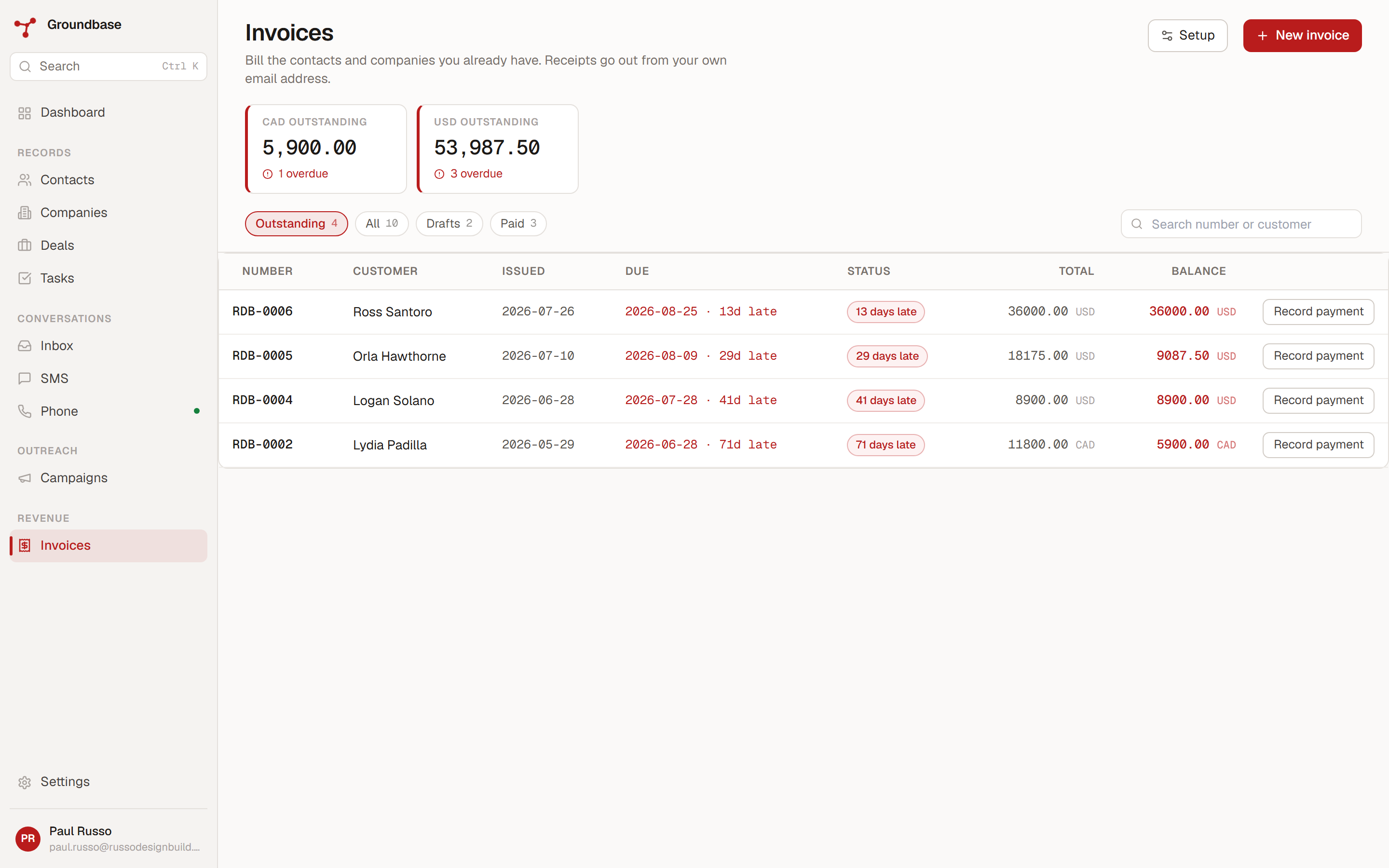
No separate customer list
When you raise an invoice, you pick a contact or a company from your CRM. There is no customer record to create, because the customer already exists — you have been emailing them for six months.
Each contact or company can carry a billing profile: their billing email, billing address, tax ID, currency and payment terms. Pick them on an invoice and all of it fills in. Change their address once and every future invoice is right.
That is the part two-systems setups cannot do. Not because invoicing tools are bad, but because they have no idea who your contacts are.
Saved items, with a real price per currency
If you sell the same handful of things repeatedly, save them as items — name, description, unit price, tax rate — and add them to an invoice in a click instead of retyping.
The part that took the longest to get right is multi-currency. Most tools store one price and convert it, which means a $200 item becomes 271.43 in another currency and looks like exactly what it is: a conversion.
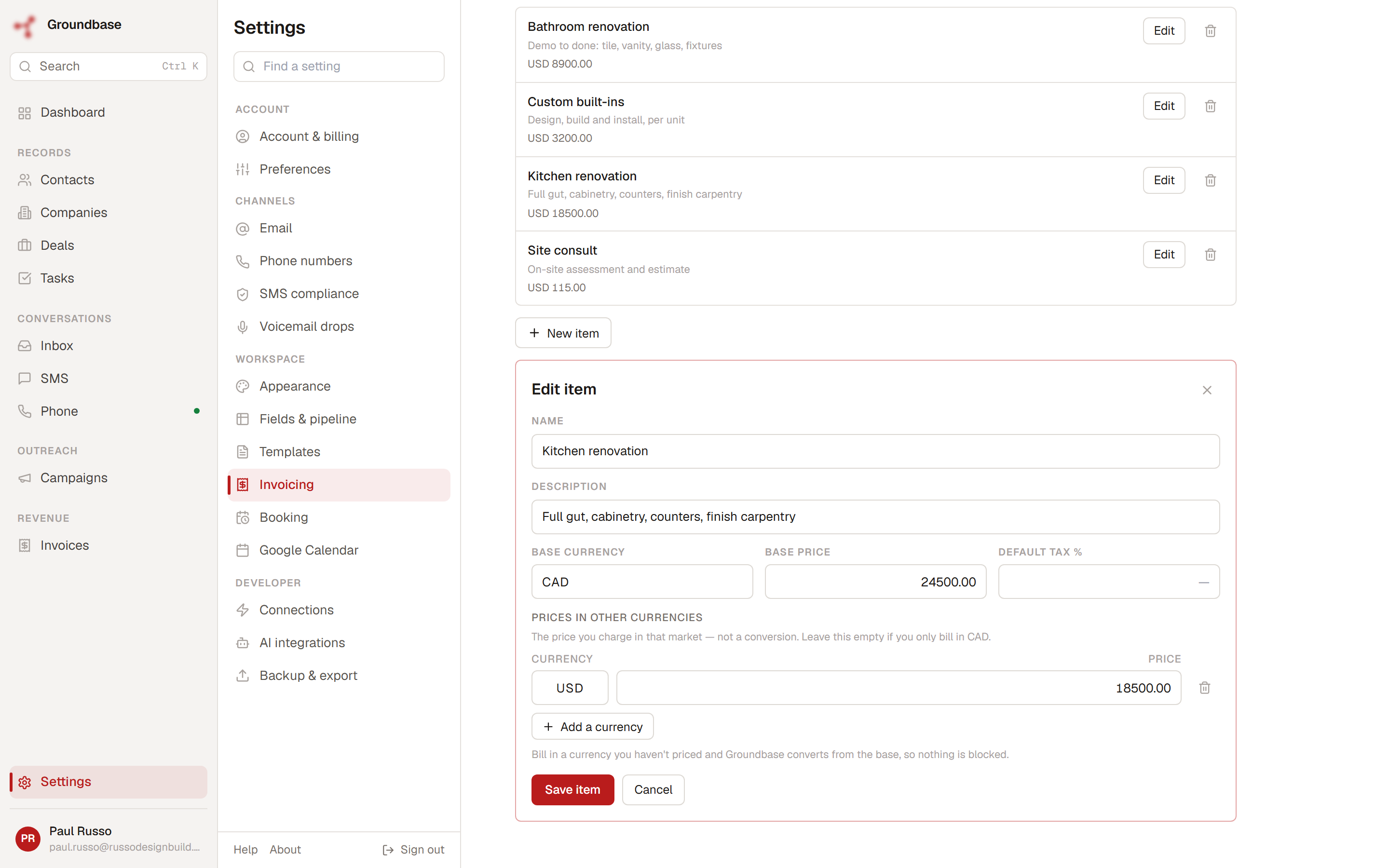
A saved item in Groundbase holds a real price in each currency you charge in. Charge 200 in one and 150 in another because those are the round numbers you actually quote, not whatever today's rate turns your base price into. Exchange rates are fetched for you where you want a conversion, and you can override any of them by hand — because if you have agreed a fixed rate with a client, the market's opinion is irrelevant.
Sending, and the page they open
Issuing an invoice does two things. It locks the numbering, and it lets you email it — from your own address, through your own email account, not from a Groundbase noreply.
The recipient gets a link to a hosted invoice page. It is deliberately a document rather than an account area: no login, no signup prompt, nothing about Groundbase beyond a quiet footer. Someone opening it wants to know what they owe and how to pay it, and anything else on that page is you spending their patience on your marketing.
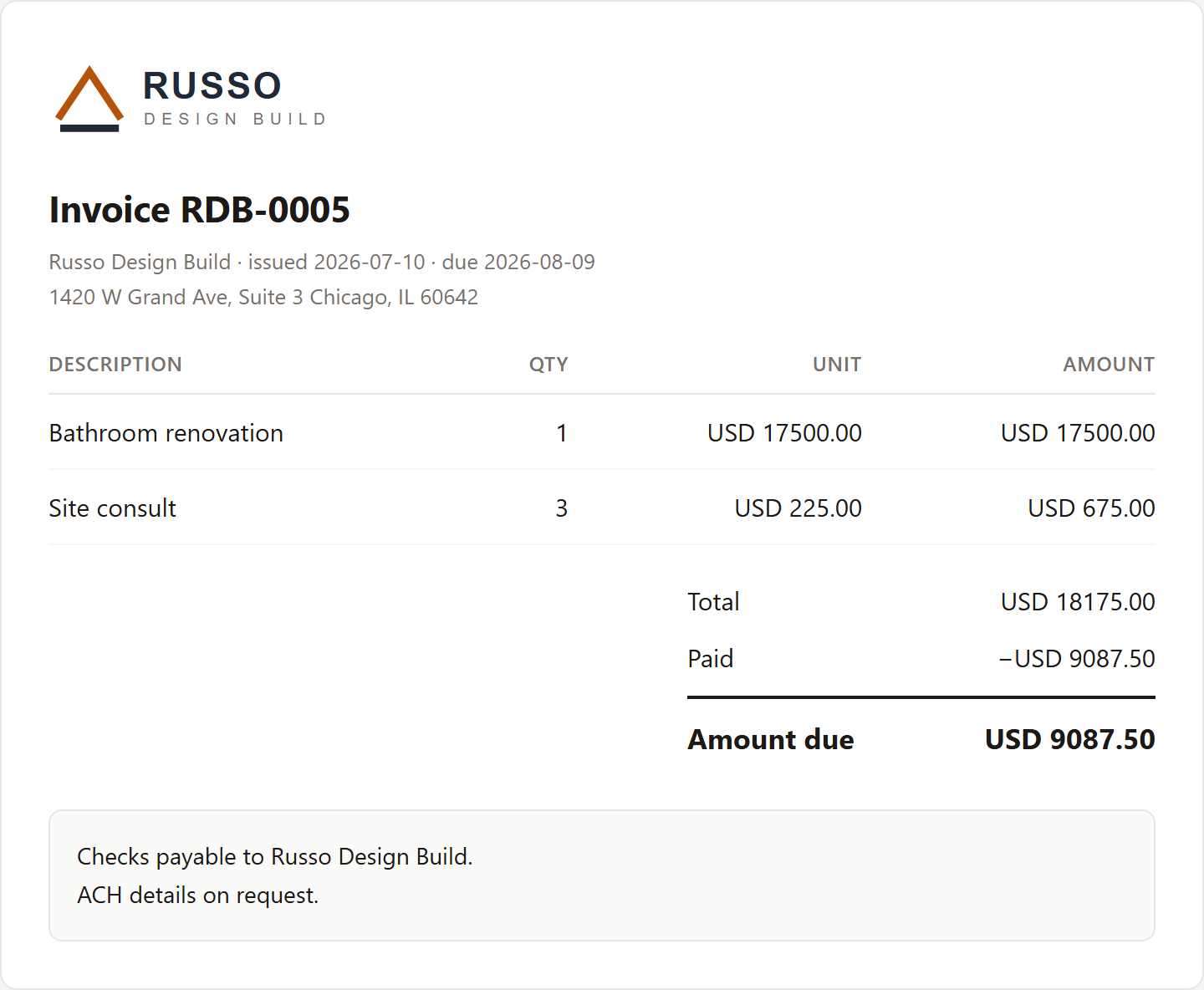
The link uses its own token rather than the invoice ID, so a link forwarded to the wrong person can be revoked without touching the invoice.
For the accounts departments that insist on an attachment, there is also a PDF button — it lays the invoice out properly with your letterhead and opens your print dialog, where Save as PDF does the rest.
Numbering that does not skip
Invoice numbers come from a gapless sequence. INV-0001, INV-0002, and no jumps.
That sounds fussy until an accountant asks where invoice 0007 went. Systems that number optimistically — assigning as you start a draft — leave holes wherever someone abandoned one, and explaining a hole is a conversation nobody wants. Numbers here are assigned at issue, not at draft.
Receipts have their own separate gapless sequence, for the same reason.
Payments and receipts
Record a payment against an invoice — full or partial — and the balance updates. Partial payments are a real state rather than a note in a comment field, so an invoice can sit at partially paid with the remainder tracked.
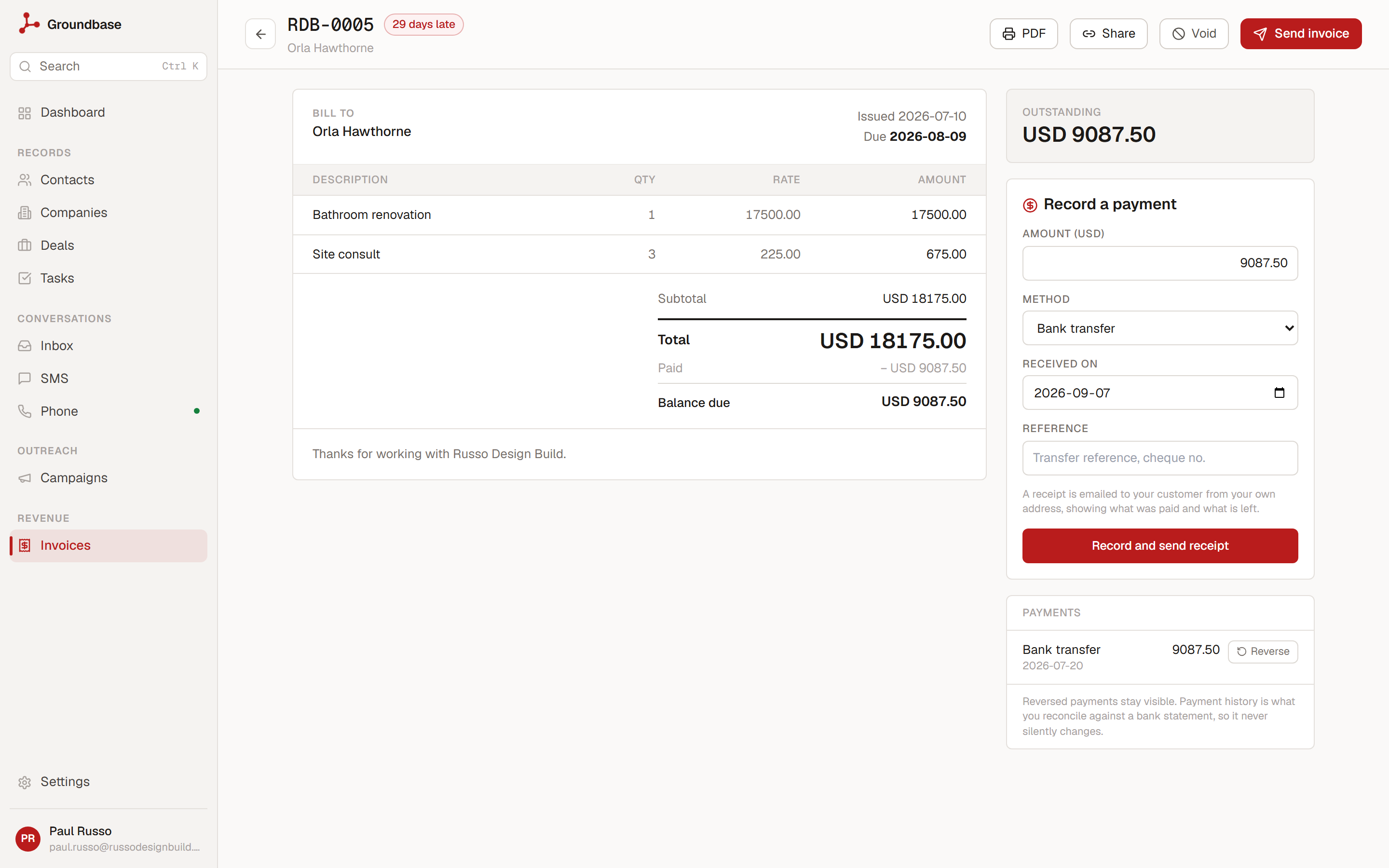
When a payment is recorded, the receipt sends itself, again from your address. This is the bit that quietly saves the most time, because sending receipts is exactly the kind of admin that gets deferred and then done in an uncomfortable batch three weeks later.
If you bill the same thing on a schedule, an invoice can repeat — weekly, monthly, quarterly or yearly — either as a draft for you to check or issued and emailed automatically. And if you switch them on in Settings → Invoicing, overdue reminders go out a set number of days after the due date, through the same email the customer already had.
Quotes, with a deposit
Before the invoice there is often a quote. Quotes work the same way: raised against a contact or company you already have, numbered when issued, emailed from your address. The customer gets a hosted page where they accept by typing their name, or decline.
A quote can ask for a deposit, as a percentage or a fixed amount. With Stripe connected, accepting means paying the deposit by card, and the quote only counts as accepted once Stripe confirms the payment. An accepted quote turns into a draft invoice in one step, with the deposit already recorded against it.
Time, billed onto an invoice
If you bill by the hour, log time against a contact, company or deal — by hand, or with a timer you can start on the desktop and stop from your phone. The rate is frozen on the entry when you log it, so a later rate change does not rewrite hours already worked.
When you build an invoice, Add unbilled time pulls those entries in as lines. They are marked billed on that invoice, and released again if the invoice is voided or deleted, so the same hour cannot be billed twice.
It shows up where the customer does
Because invoices live in the CRM rather than beside it, they appear on the contact and the company. Open someone's record and you see what they owe alongside the deals, the notes and the messages.
"Have they paid?" stops being a different tab. It is the same question as "what have we been talking about", answered in the same place. Every issue, send and payment also lands in the activity history, so the record of what happened is one timeline rather than two.
What it does not do
Being straight about this, because a features post that oversells is worse than no features post:
Card payments go through your own Stripe. Connect your Stripe account and the customer can pay the invoice by card from the invoice page; the payment is recorded on the invoice for you. Payments that happened elsewhere — bank transfer, cash, cheque — you record by hand. Without Stripe connected, recording by hand is the only option.
Not accounting software. No ledger, no expenses, no tax filing, no reconciliation. It raises invoices, tracks what came in against them, and stops. If you need books, you still need books — this feeds them rather than replacing them.
Building invoices is a desk job. On mobile you can see what is outstanding and who is late, issue and send an invoice, share its pay link, record a payment (which sends the receipt) and void one. Adding and editing lines stays on web and desktop, because line-item editing on a phone is not something anyone wants.
Who this actually helps
If your invoicing tool and your CRM contain the same fifty people and you maintain both, the duplication is the cost — not the subscription.
If you invoice a few times a month, in more than one currency, to people you also email and text, this removes a whole system from your week.
If you invoice hundreds of times a month, or you need subscriptions that charge a saved card automatically, use something built for that. This is not that, and it will be a downgrade.
Related reading: what a spreadsheet stops being able to do covers the same shape of problem one layer earlier, and who Groundbase is and is not for is the honest version of the paragraph above. If you are wondering how sending from your own address works, setting up Resend and verifying your sending domain is the setup that makes invoices and receipts arrive rather than land in spam.
Invoicing something unusual and not sure it fits? Tell me the shape of it: blog-invoicing@groundbasecrm.com — I read every one.
Built by a solo dev. Try it.
Start your 14-day trial →More from the Pipeline
Quotes with a deposit: price the job before you invoice it
A quote in Groundbase is a priced offer the customer accepts online, optionally by paying a deposit through…
How to leave Groundbase
Everything you put into Groundbase comes out with one button, at any time, including after you stop paying.…
Free offline CRMs for Windows (2026): what's out there and what each one needs
Most "free CRMs" are a website with a free plan, a user limit and a contact cap. If you want one that runs …
Bill your hours without retyping them
Track time with a timer or log it after the fact, let the hourly rate remember itself, and put the unbilled…